RulerSmith
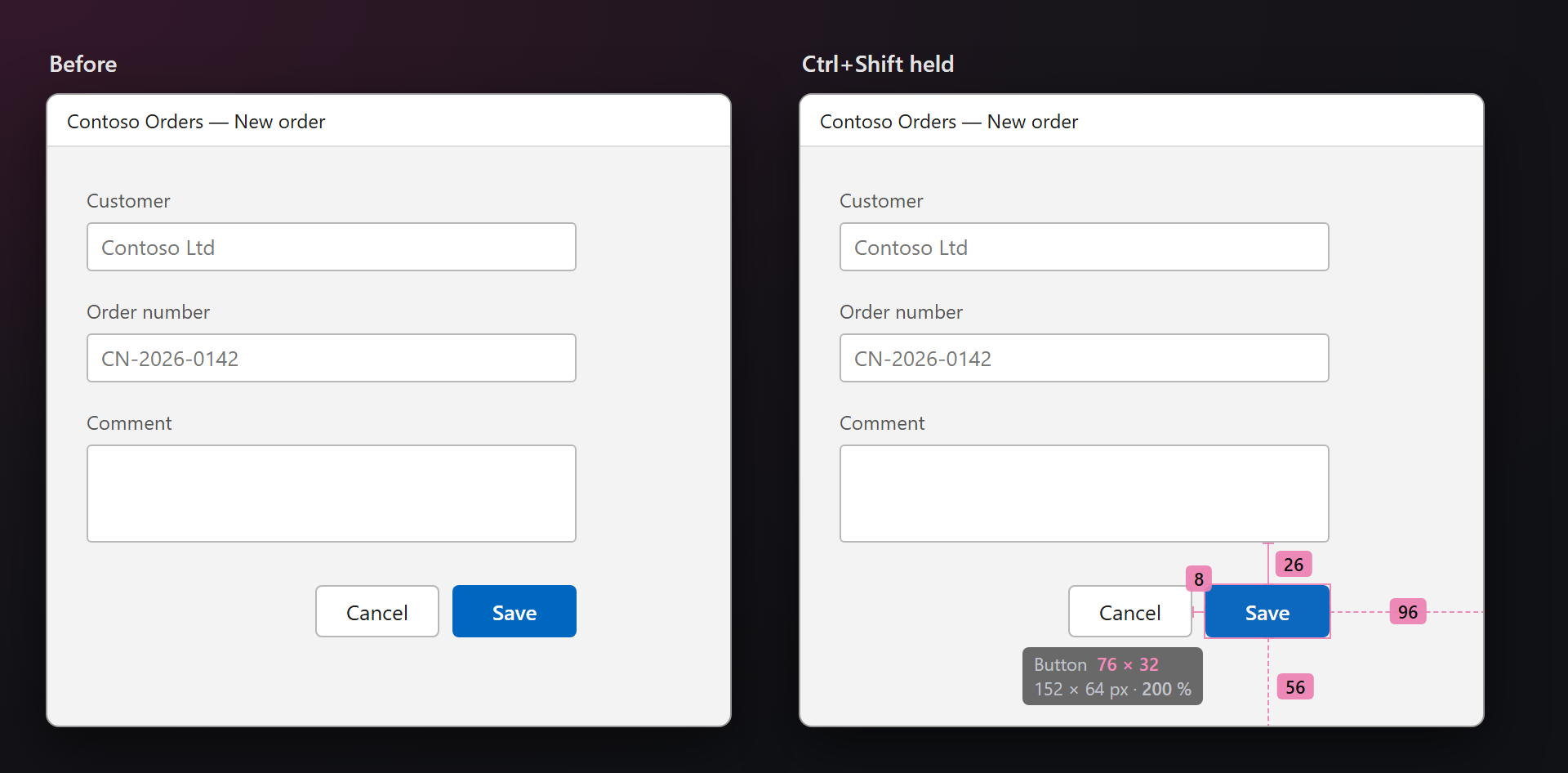
Hold Ctrl+Shift over the app you are debugging: the control under the pointer shows its size, and soft arrows show the distances to the controls around it. Let go, and it is gone.
Free · Visual Studio 2022 and 2026 · 14 UI languages · no telemetry
Why RulerSmith
Real bounds, not a guess
Sizes come from UI Automation — the tree screen readers use — so shadows, gradients and anti-aliasing do not fool it, as they fool a pixel ruler.
The units you write
WPF and web pages lay out in device-independent units: 76 × 32 is what you put in XAML or CSS, and the screen pixels (152 × 64 at 200 %) are shown below it.
Only while the key is held
Nothing is computed or drawn until you hold the key. The overlay never takes a click or the focus, and it rests while the debugger is paused.
Free, without strings attached
No subscriptions, no "pro" version, no data collection, no messages in the Output window or at startup. The only thing we will ever ask — after you have used it for a while — is a rating on the Marketplace. Works on Visual Studio 2022 and 2026, x64 and ARM64.
Features
- The size of the control under the pointer with its kind (Button, ComboBox…), in the app's units and in screen pixels on a scaled display.
- Gaps to the neighbours: the nearest control on each side, or the edge of the container when there is none — the lines you would draw by hand.
- Per-monitor DPI: each monitor's scale is taken into account, WinForms and Win32 apps are measured in their own pixels, DPI-aware or not.
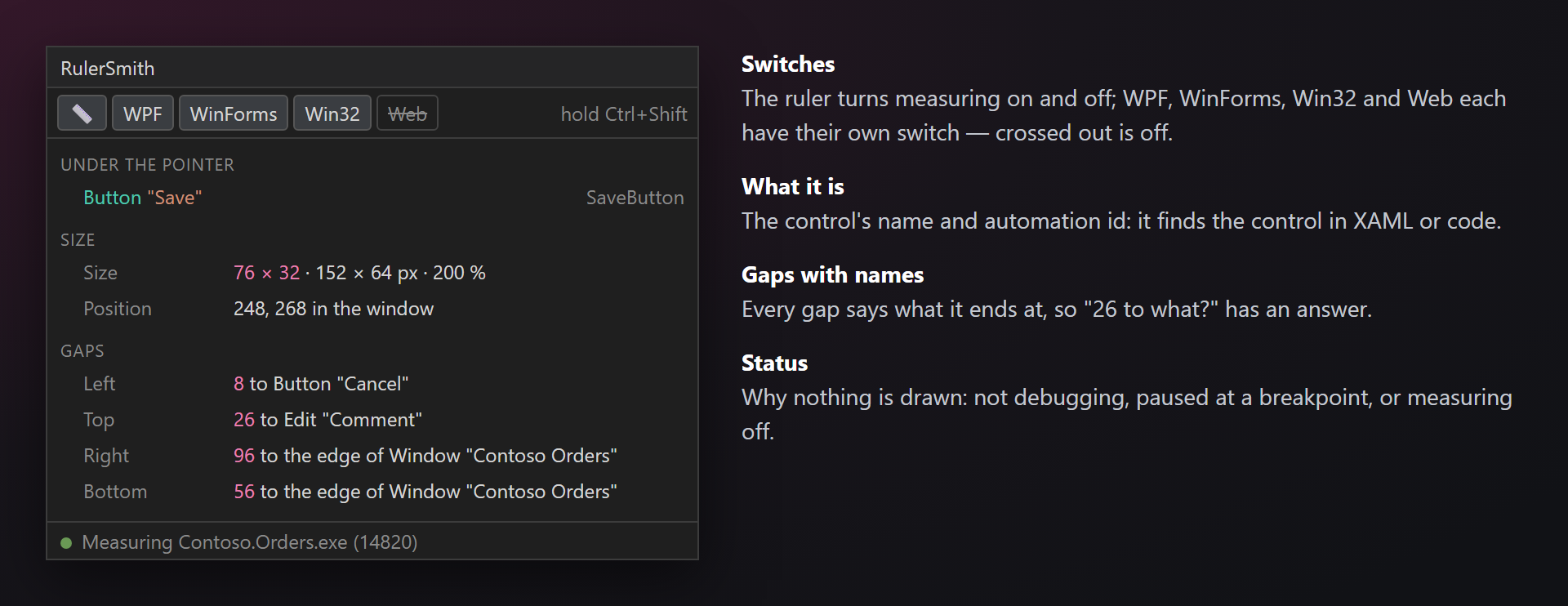
- The RulerSmith panel: the control's name and automation id, its size, position and gaps with what they end at; switches for measuring and for each kind of app.
- A soft entrance: the outline fades in, then the arrows grow out of the control — or everything at once, or no animation at all.
- Bound to the debug session: it starts with F5, measures only the debugged app (and what it opens, like WebView2 or the browser of a web project) and stops with the session.
Measuring
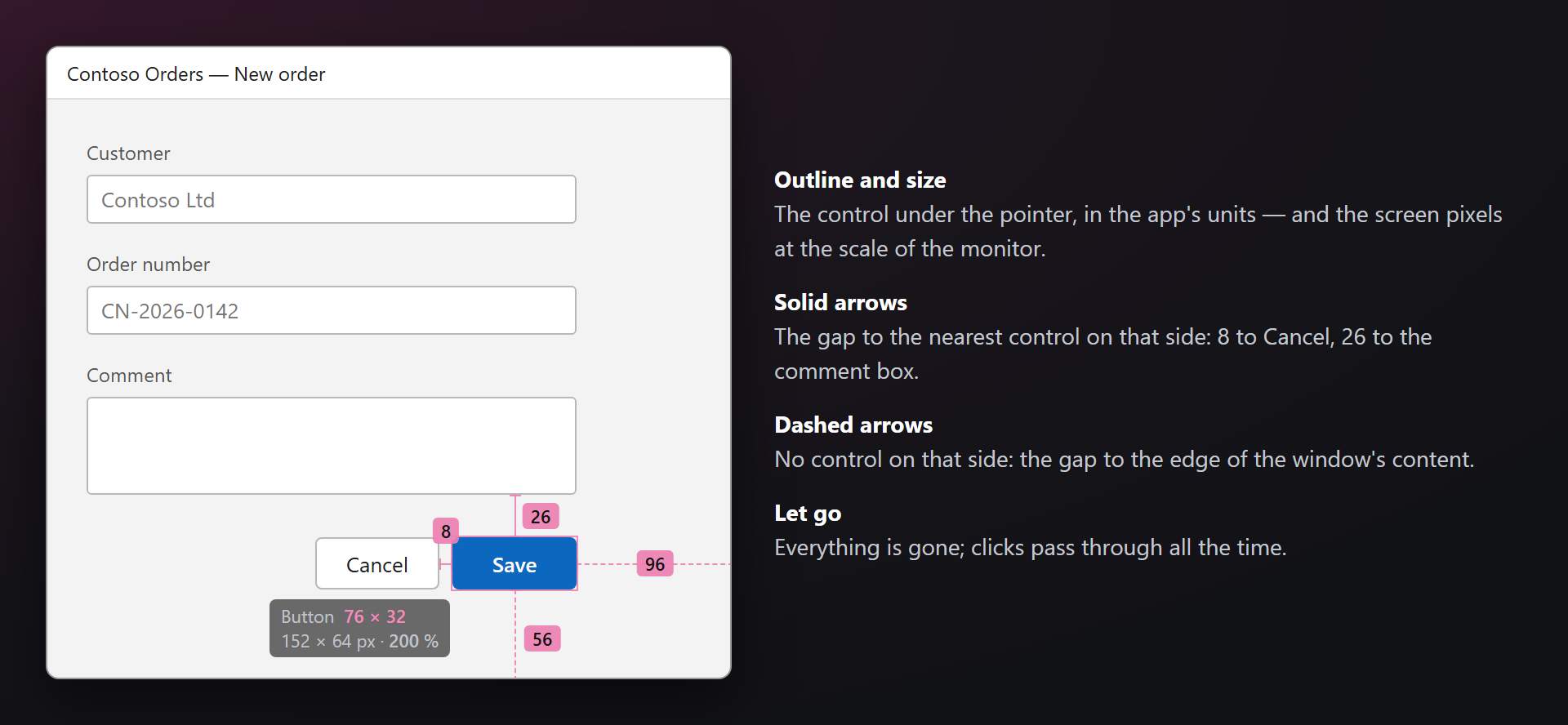
Start debugging, hold Ctrl+Shift and move the pointer over the app. A new control is outlined, its size appears under it, and the gaps run out to the neighbours; the numbers follow the pointer from control to control.
| On screen | Meaning |
|---|---|
| Thin outline | The bounds of the control under the pointer. Text or an icon inside a button counts as the button. |
| Button 76 × 32 152 × 64 px · 200 % | The kind and the size in the app's units; on a scaled display the screen pixels and the scale on a second line. |
| Solid arrow | The gap to the nearest control on that side. Touching controls show no arrow. |
| Dashed arrow | No control on that side: the gap to the edge of the container (the client area of a window). |
The RulerSmith panel
Debug → RulerSmith Panel (also in View → Other Windows). The toolbar turns measuring on and off — the same switch as Measure Layout on the Debug toolbar — and each kind of app separately: WPF, WinForms, Win32, Web. Below it, the last measurement: the control's name and automation id (it finds the control in XAML), its size, its position in the window and every gap with the control it ends at. The status line tells why nothing is drawn: not debugging, paused at a breakpoint, or measuring off.
Which apps
RulerSmith reads the controls through UI Automation, so it measures what the app exposes there — which is what standard controls do out of the box.
| App | Notes |
|---|---|
| WPF | Units are device-independent. The see-through XAML toolbar Visual Studio lays over a debugged WPF app is skipped; the content of tabs is found. |
| Windows Forms | Units are the app's pixels: 1:1 for a DPI-aware app, stretched by Windows for one that is not. |
| Win32, MFC | Windows created with CreateWindow and dialogs from resources: buttons, edits, combo boxes, lists, trees. |
| Web pages | Edge, Chrome and Firefox while debugging — Visual Studio often opens a web project in the browser that is already running. CSS pixels are the units. The Web switch in the panel turns them off. |
Not supported: WinUI, UWP and MAUI. A custom control that does not create an automation peer is invisible to UI Automation, and its container is measured instead.
Settings
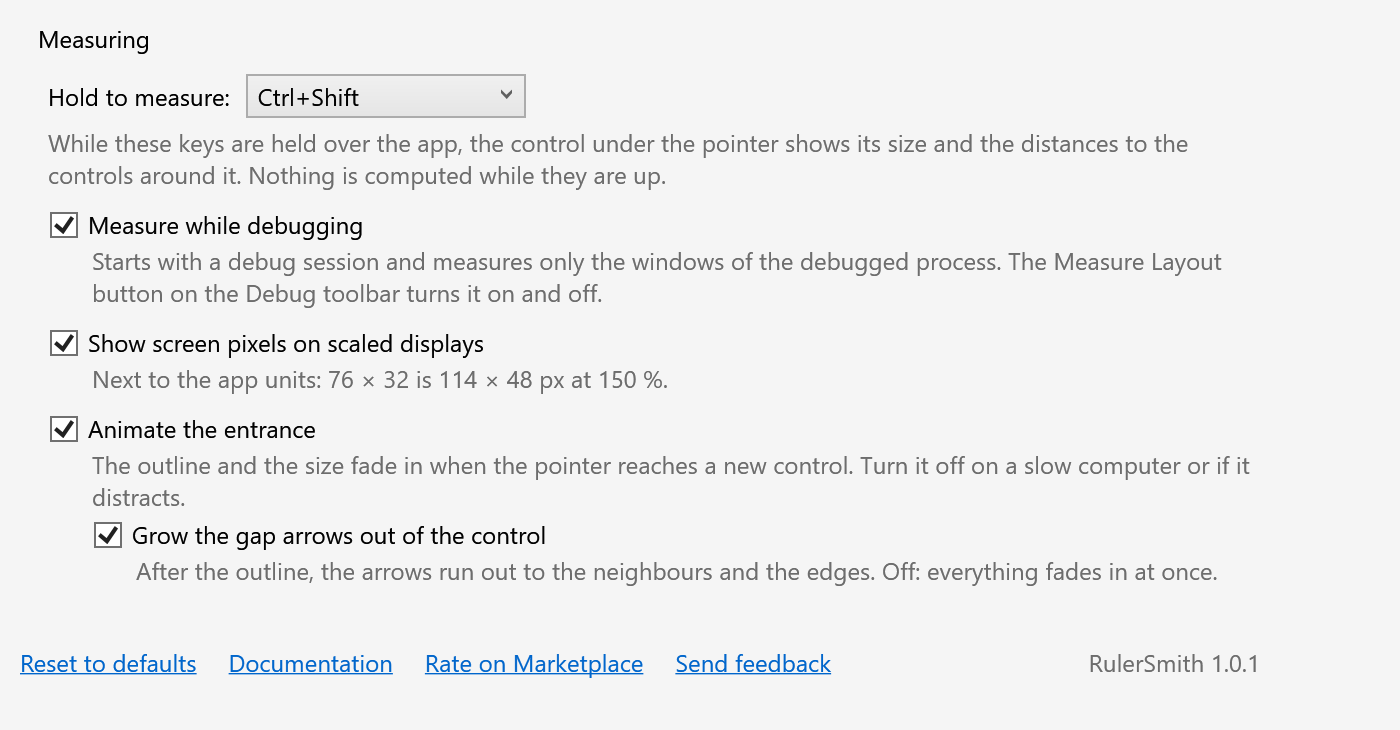
Tools → Options → SmithWorks → RulerSmith. Every option has a description.
| Option | Default |
|---|---|
| Hold to measure | Ctrl+Shift |
| Measure while debugging | on |
| Show screen pixels on scaled displays | on |
| Animate the entrance | on |
| Grow the gap arrows out of the control | on |
| Ask for a rating on the Marketplace | on |
Settings are stored in %LocalAppData%\RulerSmith.
FAQ
Does RulerSmith send any data?
No. Everything happens on your computer: a small overlay process reads the controls through UI Automation and draws on the screen. No network requests, no telemetry.
Only the whole window (or a large panel) is outlined. Why?
The app does not expose the controls inside it to UI Automation — usually custom controls without an automation peer. Overriding OnCreateAutomationPeer in such a control makes it measurable, and accessible to screen readers too.
Nothing is drawn when I hold the key.
Check that a debug session is running and not paused, and that the panel's status line says Measuring. A kind of app may be switched off in the panel. Another program may use the same keys: choose another combination in the settings.
Why does it stop at a breakpoint?
A paused app cannot answer UI Automation. The overlay rests until you continue (F5).
Will WinUI, UWP or MAUI be supported?
Not for now. If you need them, say so in the Feedback repository.
Can I measure an app without Visual Studio?
Yes: run RulerSmith.Overlay.exe from the extension's folder. It sits in the tray and measures any window while the key is held.
Where do I report a problem or suggest a feature?
Open an issue in the Feedback repository on GitHub — there are forms for bugs and ideas (please change private names). You can also use the Q&A tab on the Marketplace.
Changelog
1.0.2
- A one-time request for a rating on the Marketplace, after the extension has been useful — with Later and Don't ask again, and an option to turn it off.
1.0.1
- “Rate on Marketplace” link in the settings.
1.0.0
- First public release.