PackageSmith
NuGet package versions right where they are written: the newest version after every package line, the whole history on hover, an update with Ctrl+. — and vulnerable or deprecated packages flagged before the build does.
Free · Visual Studio 2022 and 2026 · 14 UI languages · no telemetry
Why PackageSmith
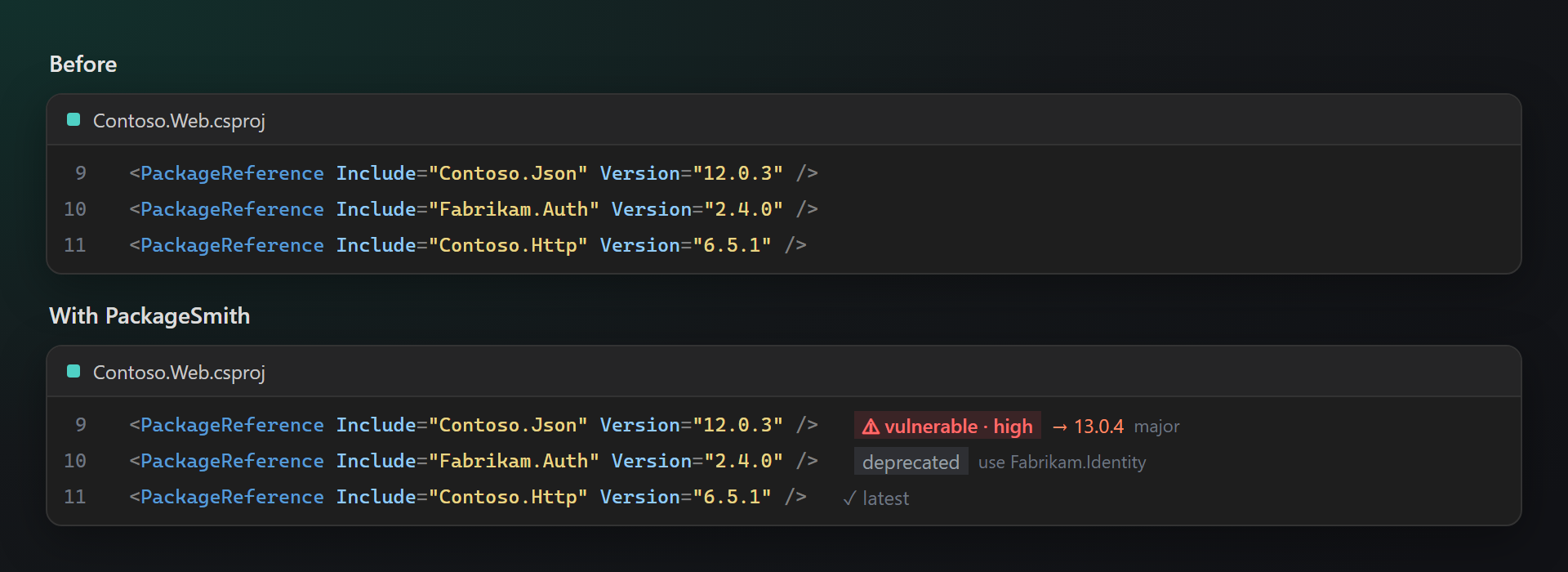
Outdated at a glance
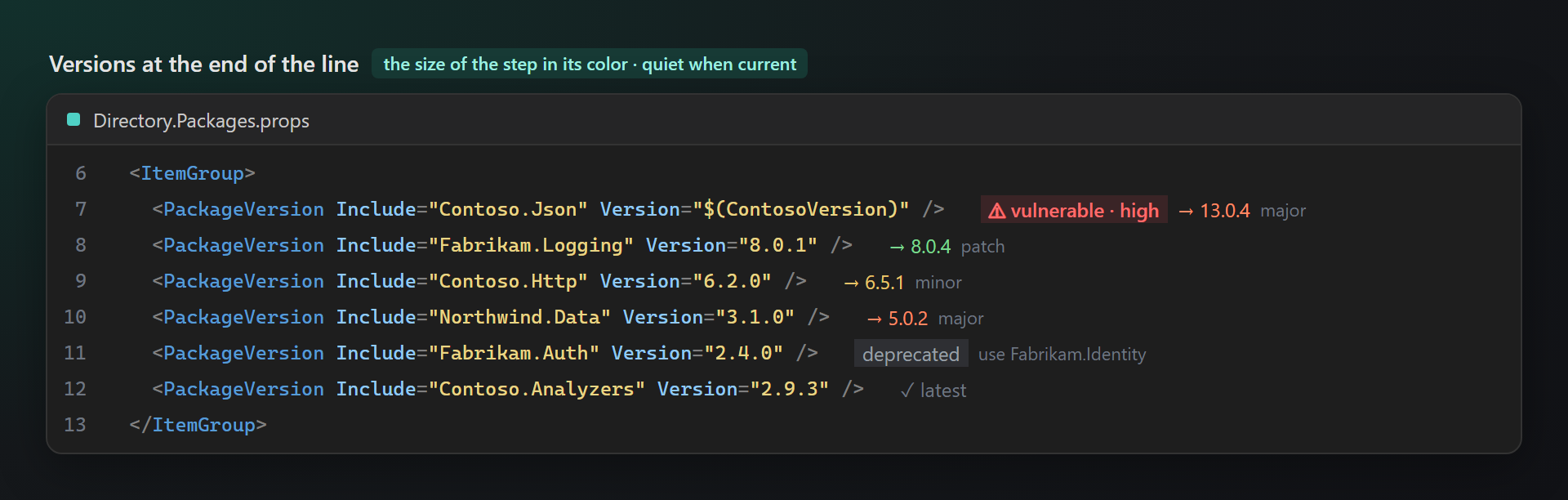
No need to open the NuGet window to learn what is old: the newest version stands after each package, green for a patch, yellow for a minor, orange for a major.
Safe updates first
A known vulnerability is red right on the line, with the closest version that fixes it; a deprecated package names its replacement.
Your sources only
Versions come from the package sources of your NuGet.config — nuget.org or your company feed. Only package names and versions are asked for; nothing about you or your project is sent.
Free, without strings attached
No subscriptions, no "pro" version, no data collection, no messages in the Output window or at startup. The only thing we will ever ask — after you have used it for a while — is a rating on the Marketplace. Works on Visual Studio 2022 and 2026, x64 and ARM64.
Features
- The newest version after each package, colored by the size of the step; a dim
✓ latestfor current packages. - Vulnerable and deprecated packages: the severity of a known vulnerability, and the replacement of a deprecated package.
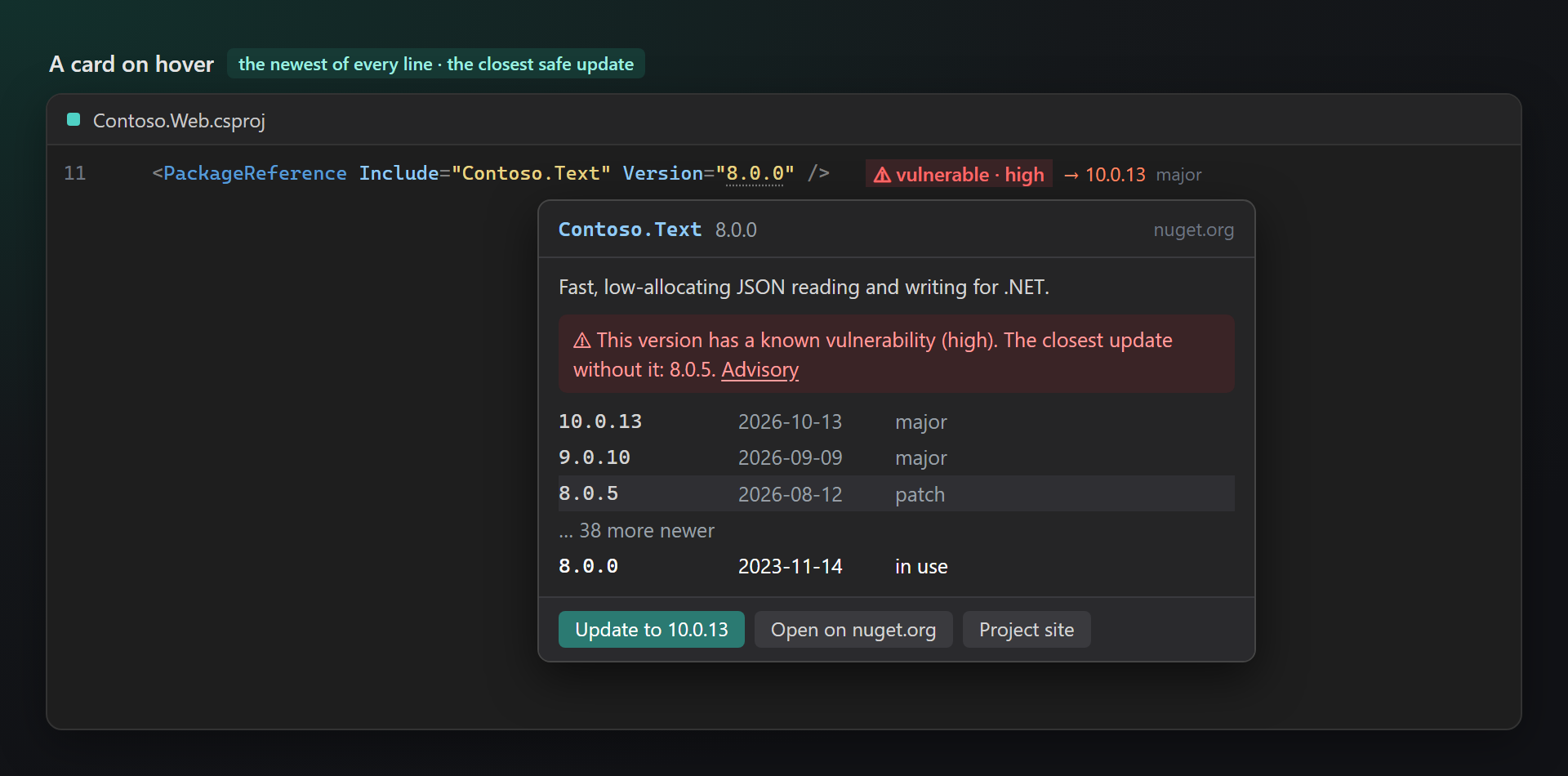
- A card on hover: the description, the newest version of every newer line with its date, and the update one click away.
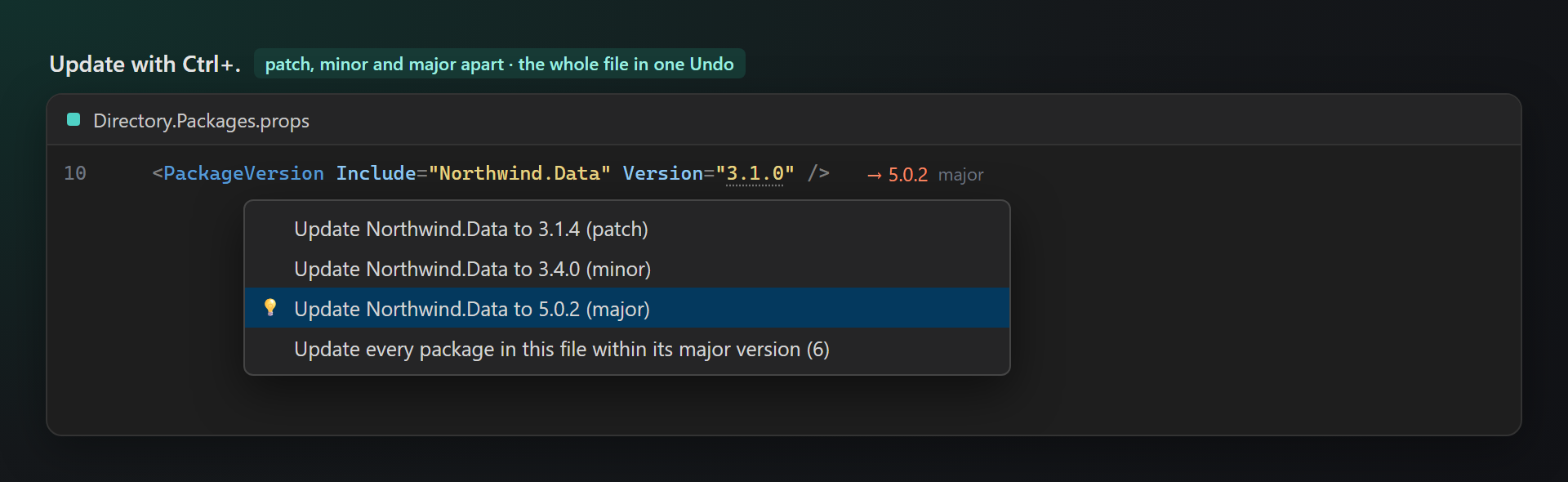
- Update with Ctrl+.: to the newest patch, minor or major, or every package of the file within its major version — one edit, one Undo.
- Every package file:
.csproj,.vbproj,.fsproj,Directory.Packages.props(central package management),.props,.targetsandpackages.config;Version="$(ContosoVersion)"is resolved from the file. - Your package sources from NuGet.config, answers cached between sessions, an offline switch.
Versions at the end of the line
After every PackageReference, PackageVersion and package line: nothing loud when the package is current, the newest version in the color of the step otherwise. Unlisted versions are never offered; prereleases only to packages that already use one, unless a setting says otherwise.
| After the line | Meaning |
|---|---|
| ✓ latest | The package is on its newest version. |
| → 8.0.4 patch | Only the third number changes: fixes. |
| → 6.5.1 minor | The second number changes: new features, no breaking changes intended. |
| → 5.0.2 major | The first number changes: where breaking changes live. |
| ⚠ vulnerable · high | The version in use has a known security vulnerability, with its severity. |
| deprecated · use … | The authors deprecated the package, and name the one to use instead. |
A card on hover
Rest the pointer on a version in the code or on the text after the line: the card shows the description, the newest version of every newer line (10.0.13, 9.0.10, 8.0.21 for a package on 8.0.0) with its date, how many more newer ones there are, the vulnerability with the closest update without it, and the buttons Update to …, Open on nuget.org and Project site. A click on any version in the list sets it.
Update with Ctrl+.
Caret on a package line, Ctrl+.: the newest patch, the newest minor and the newest major are offered separately, so the safe update is always one key away. Update every package in this file within its major version takes each package to its newest version of the same major — majors stay a decision of their own. A version from a property ($(ContosoVersion)) is updated where the file defines it. The file is edited like a manual change: Undo works, and Visual Studio restores the packages as usual.
Settings
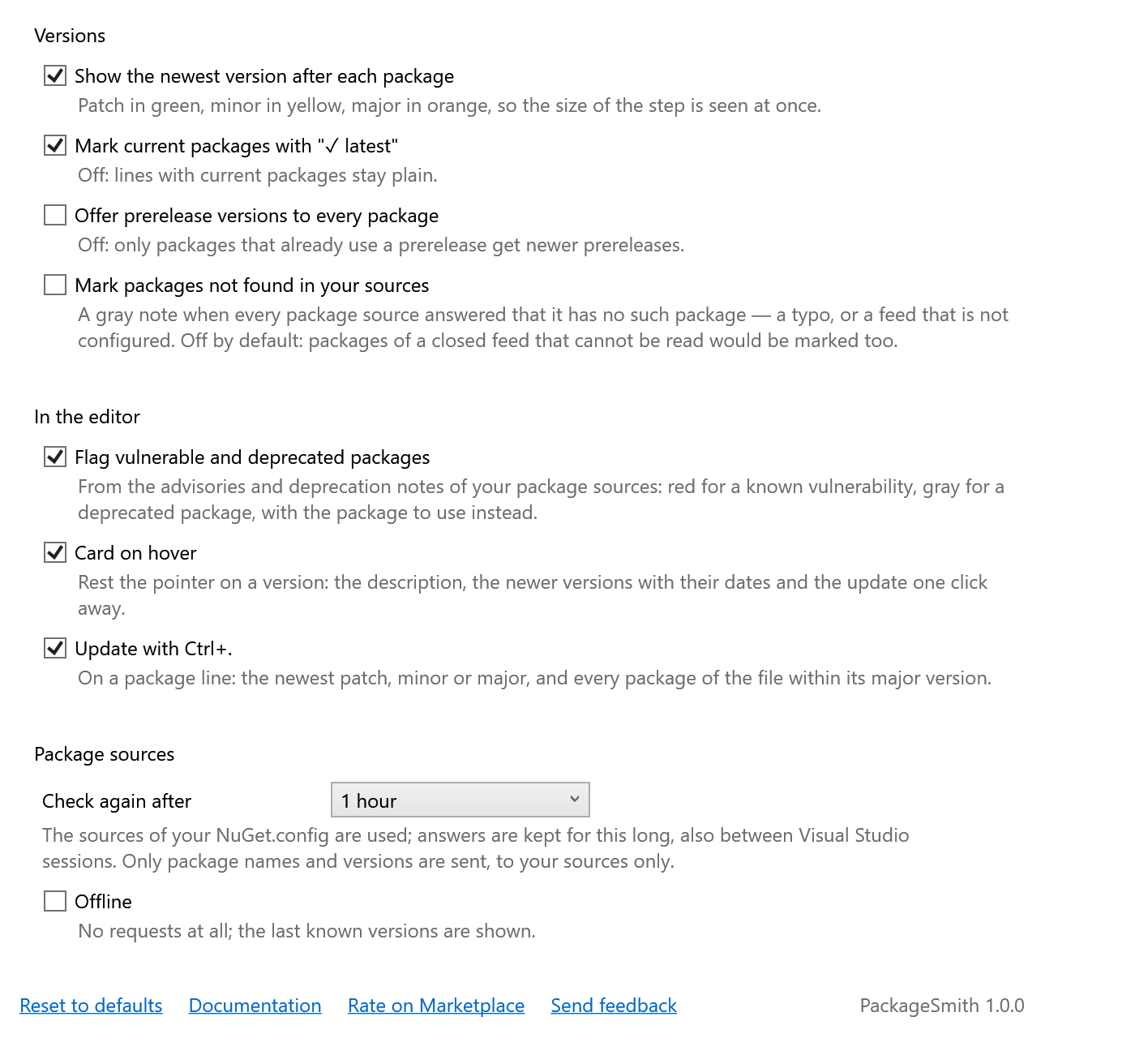
Tools → Options → SmithWorks → PackageSmith. Every option has a description.
| Option | Default |
|---|---|
| Show the newest version after each package | on |
| Mark current packages with "✓ latest" | on |
| Offer prerelease versions to every package | off |
| Mark packages not found in your sources | off |
| Flag vulnerable and deprecated packages | on |
| Card on hover | on |
| Update with Ctrl+. | on |
| Check again after | 1 hour |
| Offline | off |
| Ask for a rating on the Marketplace | on |
Settings are stored in %LocalAppData%\PackageSmith, the cached versions next to them.
FAQ
Does PackageSmith send any data?
It asks your package sources (from NuGet.config; nuget.org without one) for the versions of the packages in your files — the same requests Visual Studio makes when it restores them. Nothing else is sent: no telemetry, no project names, nothing about you. With Offline on, no request is made at all.
My company feed needs a login. Does it work?
Not yet: feeds that need credentials are skipped, and their packages stay plain — no wrong answer is shown. Public v3 feeds (nuget.org, open company feeds) work.
Why is there nothing after some packages?
Nothing is written when the version is a range or a wildcard ([1.0,2.0), 13.*), when a property is defined in another file, or when no source answered. Turn on Mark packages not found in your sources to see packages that every source answered it does not have.
Does it work with central package management?
Yes: the versions are shown in Directory.Packages.props after every PackageVersion, and VersionOverride in a project is shown too.
Does the update restore the packages?
PackageSmith only edits the file. Visual Studio restores the packages after the change, as it does when you edit the version by hand.
Does it work together with LensSmith?
Yes. Both write at the end of lines, so they share that space: the version comes first, a NuGet warning from LensSmith after it.
Where do I report a problem or suggest a feature?
Open an issue in the Feedback repository on GitHub — there are forms for bugs and ideas (please change private names). You can also use the Q&A tab on the Marketplace.
Changelog
1.0.1
- A one-time request for a rating on the Marketplace, after the extension has been useful — with Later and Don't ask again, and an option to turn it off.
1.0.0
- First public release.