OutputSmith
A readable Output window for Visual Studio. Errors and warnings stand out, build and test results show at a glance, and the noise — module loads, compile steps, restore lines — steps back.
Free · Visual Studio 2022 and 2026 · 14 UI languages · no telemetry
Why OutputSmith
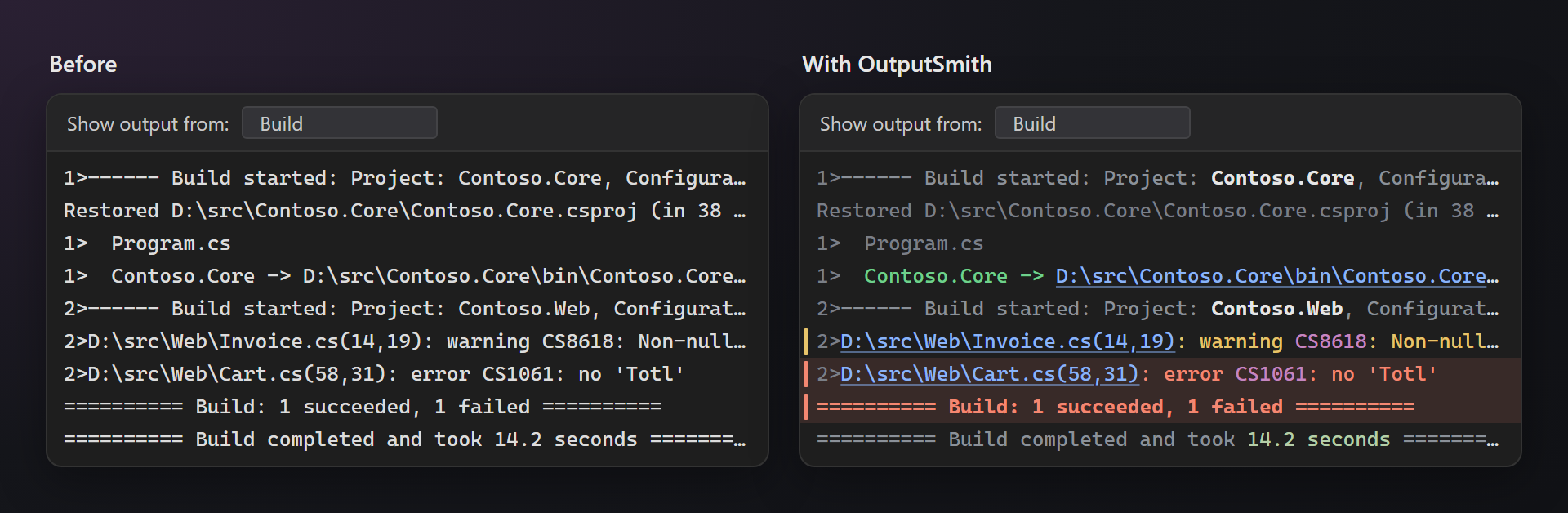
Problems first
Errors are red with a light red line and a mark left of the text, warnings are yellow. In a long build you see them before you read a single line.
Noise steps back
Module loads, exited threads, restore and compile steps, test adapter chatter are dimmed — still there, but out of the way.
Only what it really knows
Lines are recognized by the formats of MSBuild, compilers, test runners and loggers. A line that merely contains the word “error” stays as it is.
Free, without strings attached
No subscription, no trial, no nag screens, no telemetry. Works on Visual Studio 2022 and 2026, x64 and ARM64.
Features
- Results at a glance: “Build: 4 succeeded, 0 failed” and “Test run finished: … 0 Failed” are green, failed ones are red; output paths of projects (
Project -> …\bin\…dll) are green. - Errors and warnings of the compilers, MSBuild, NuGet (including vulnerability warnings
NU1901–NU1904) and CMake, with the diagnostic code highlighted. - Marks left of the text: red for errors, yellow for warnings, blue for your application's own output in the Debug pane.
- Links: file paths with their line and column, web addresses.
- Noise dimmed: module loads, exited threads, NuGet restore, C++ compile and link steps, copied-file lists, CMake checks, test host and adapter messages.
- Log levels of ILogger (ASP.NET Core), Serilog, NLog, log4net and of Visual Studio's own logs: info blue, warn yellow, error red, debug and trace gray. A message on the next lines takes the color of its entry.
- Exceptions: unhandled ones are red, “Exception thrown” (first-chance) ones yellow; stack frames with a source file stay bright, framework frames are dimmed.
- Durations and sizes:
297 ms,14.2 seconds,1.5 MB,Time Elapsed: 00:00:00.82stand out. - Dark and light themes: the colors follow the theme of Visual Studio.
Panes
| Pane | What is recognized |
|---|---|
| Build, Build Order | build headers with project names, diagnostics, results, restore, C++ compile steps, copy steps |
| Debug | module loads and threads, application output, log levels, exceptions and stack frames |
| Tests | xUnit, NUnit and MSTest messages, failed and skipped tests, run results |
| CMake | configure checks with their result, CMake errors and warnings with file links |
| Package Manager | restore lines and vulnerability warnings |
| GitHub Copilot, … | Visual Studio's own logs ([Category Information]), results such as : Succeeded |
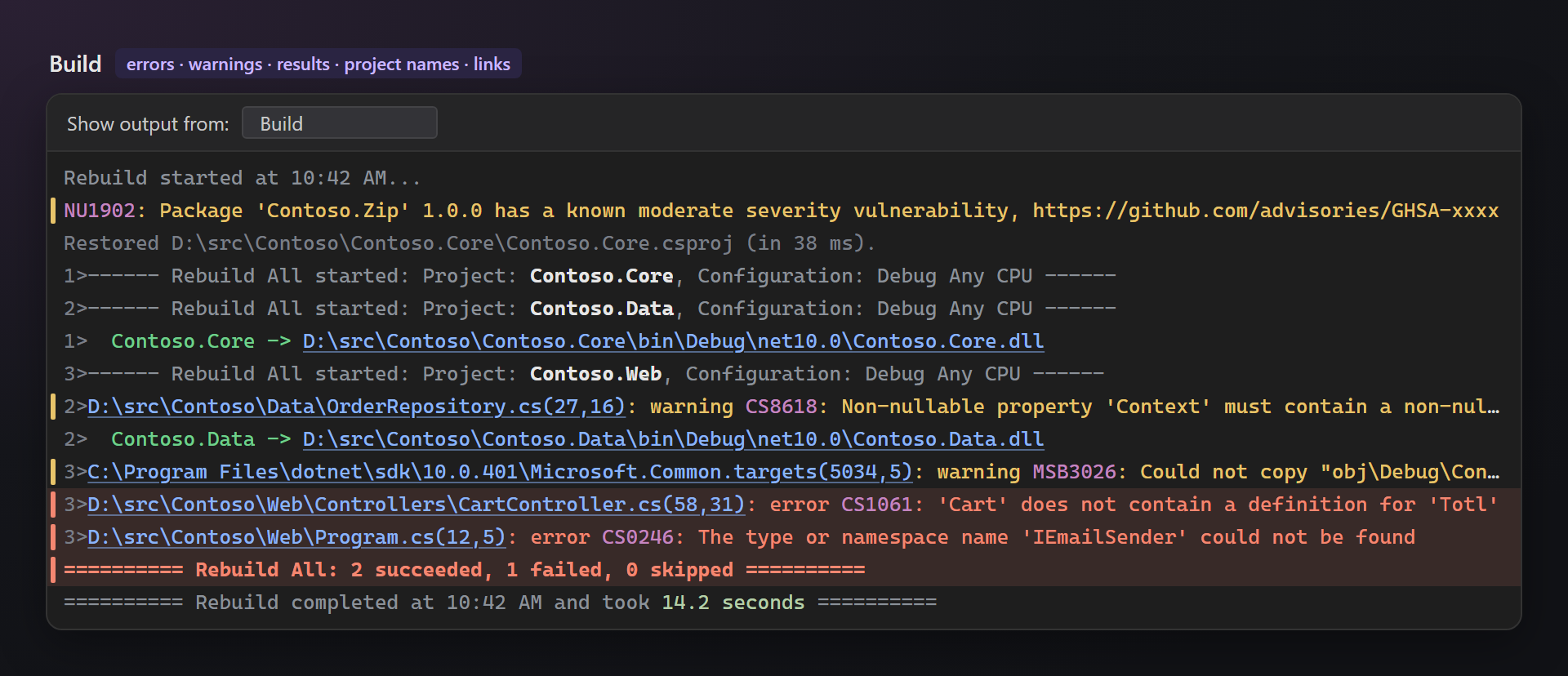
Build
Project names in “Build started” lines are bold and the rest is gray, so a parallel build is easy to follow. Errors get a light red line, warnings a yellow mark; paths and codes are highlighted.
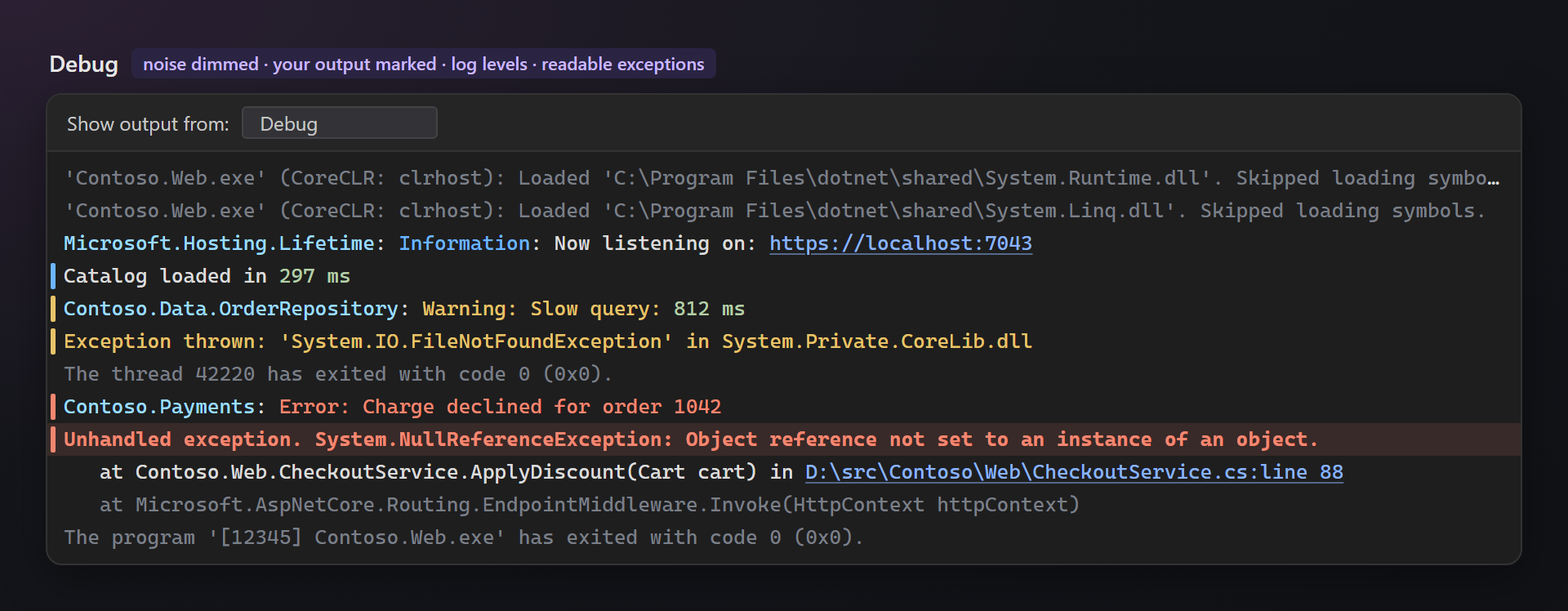
Debug
The debugger's own messages are gray, so what your application writes (Debug.WriteLine, Trace, loggers) stands out, with a blue mark. Log levels are colored; an unhandled exception is red, its frames in your code stay bright.
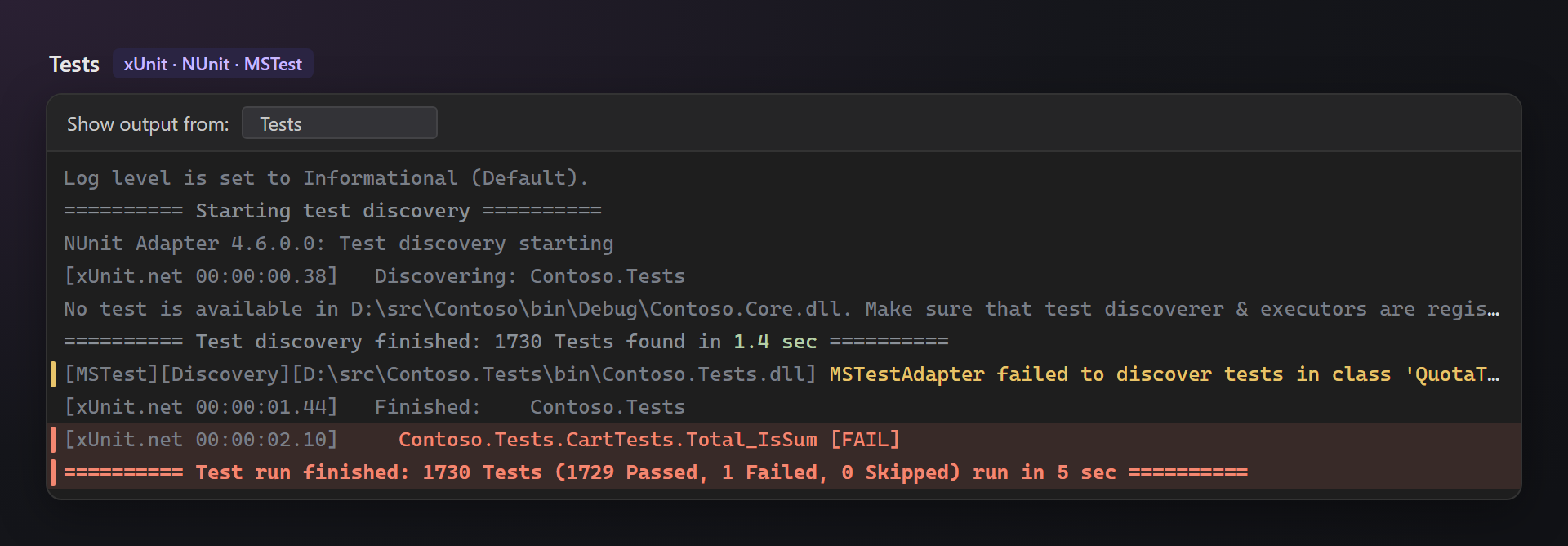
Tests and CMake
Test adapters talk a lot: xUnit, NUnit and MSTest progress and “No test is available in …” are gray. A failed test, a discovery failure and the run result stand out.
CMake and C++
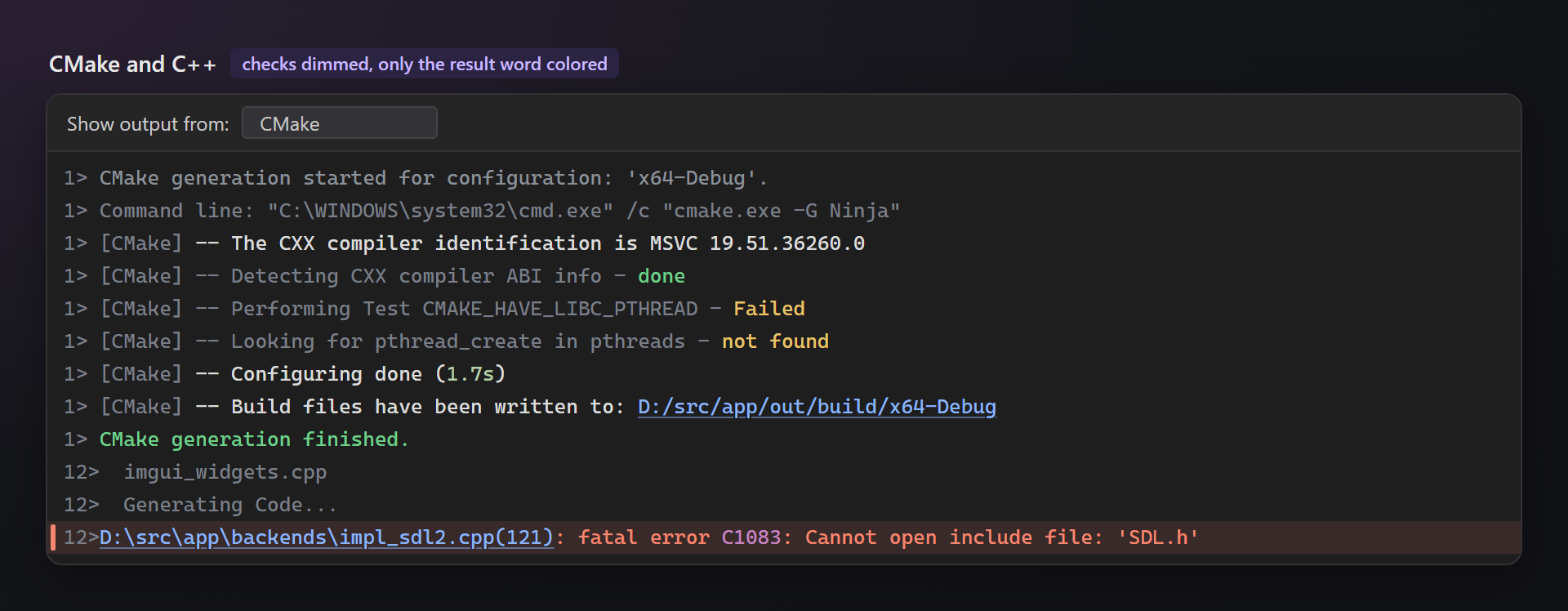
CMake checks are gray with only the result word colored — “not found” on Windows is often expected, so it is yellow, not red. File names being compiled and “Generating Code…” are gray too.
Settings
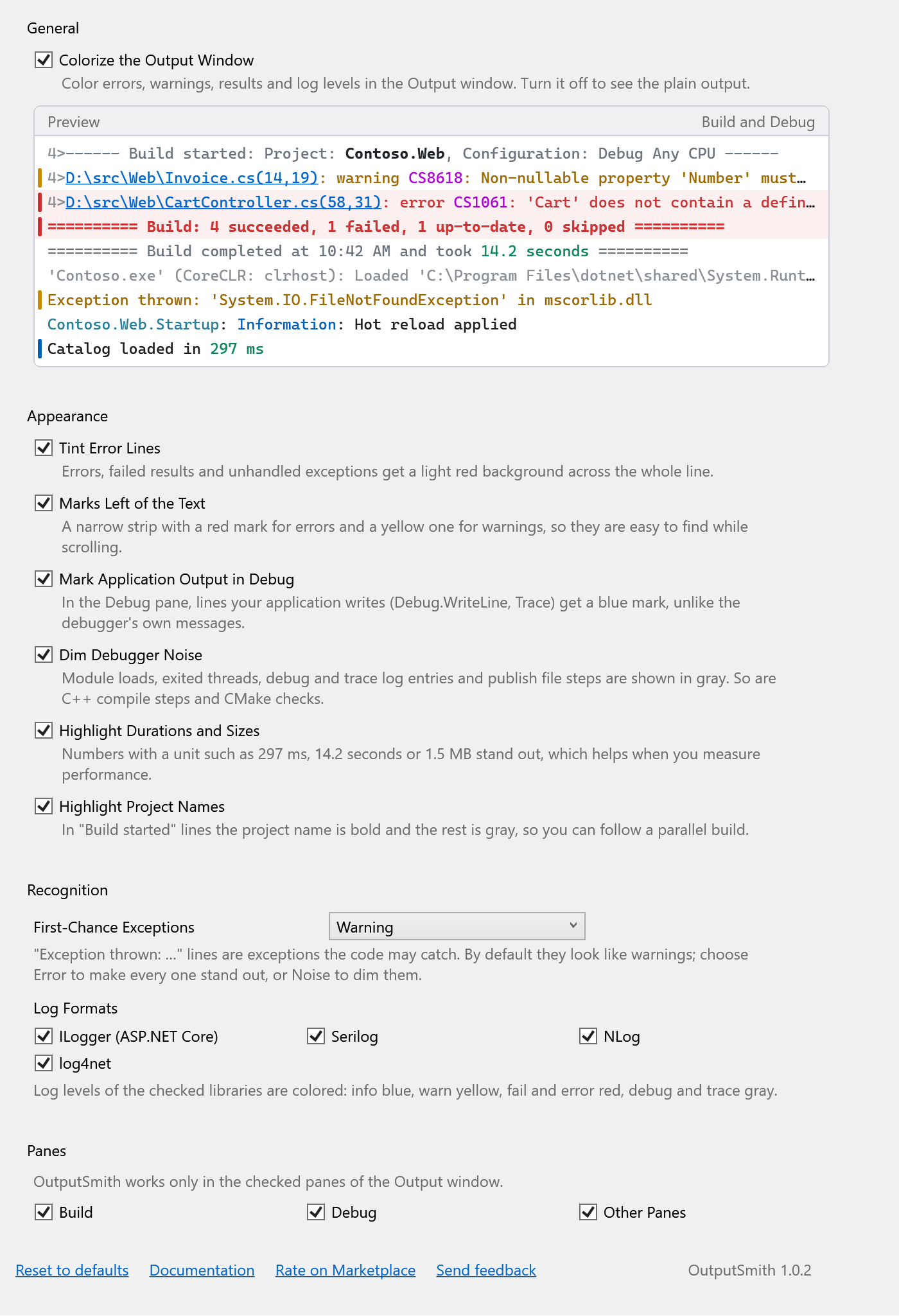
Tools → Options → SmithWorks → OutputSmith. Every option has a description, and the preview at the top shows the result right away.
| Option | Default |
|---|---|
| Colorize the Output Window | on |
| Tint Error Lines | on |
| Marks Left of the Text | on |
| Mark Application Output in Debug | on |
| Dim Debugger Noise | on |
| Highlight Durations and Sizes | on |
| Highlight Project Names | on |
| First-Chance Exceptions | Warning |
| Log Formats | all on |
| Panes | all on |
Settings are stored in %LocalAppData%\OutputSmith.
FAQ
Why does a line stay plain?
OutputSmith colors only formats it knows: MSBuild and compiler diagnostics, test runners, loggers, debugger and CMake messages. A line that merely contains “error” or “failed” is not guessed — that would color too much. Also check that its pane is turned on in the settings.
Does OutputSmith change the output?
No. It only changes how the text looks; copying, searching, double-click navigation and the Error List work as before.
Does it slow down a large build?
No. Only visible lines are colored, and each line is recognized once.
Can I change the colors?
Not yet. The colors follow the dark or light theme of Visual Studio; every highlight can be turned off in the settings.
Does OutputSmith send any data?
No. There is no telemetry and no network access.
Where do I report a problem or suggest a feature?
Open an issue in the Feedback repository on GitHub — there are forms for bugs, ideas and lines that are not recognized (please change private names). You can also use the Q&A tab on the Marketplace.
Changelog
1.0.2
- “Send feedback” link in the settings opens the Feedback repository on GitHub.
- Settings moved to Tools → Options → SmithWorks → OutputSmith, next to the other SmithWorks extensions.
1.0.1
- “Rate on Marketplace” link in the settings.
1.0.0
- First public release.