NoteSmith
Comments that stand out when they should: TODO, FIXME and friends in color, every one of them in a window for the whole solution, anchors to jump between the parts of a long file.
Free · Visual Studio 2022 and 2026 · 14 UI languages · no telemetry
Why NoteSmith
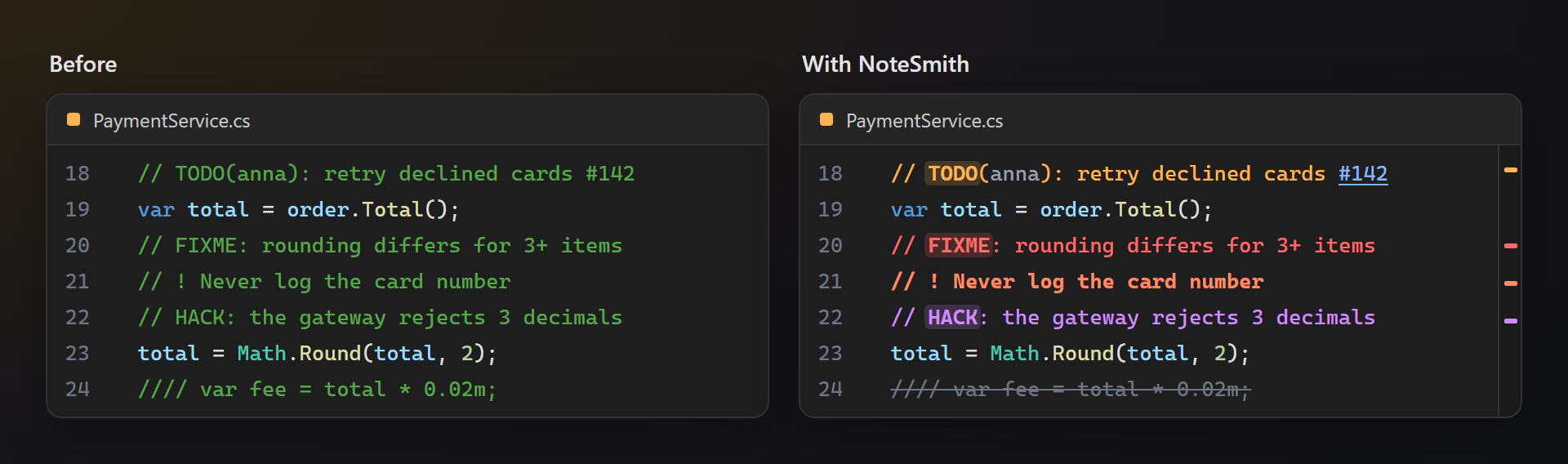
Seen at a glance
A TODO in orange with its tag on a soft chip, a FIXME in red, an important note in bold — the open questions of a file no longer hide among ordinary comments.
Every TODO of the solution
The Comments window reads every source file in the background, not only the open ones, and keeps up as you save. Double-click opens the line.
Your own tags
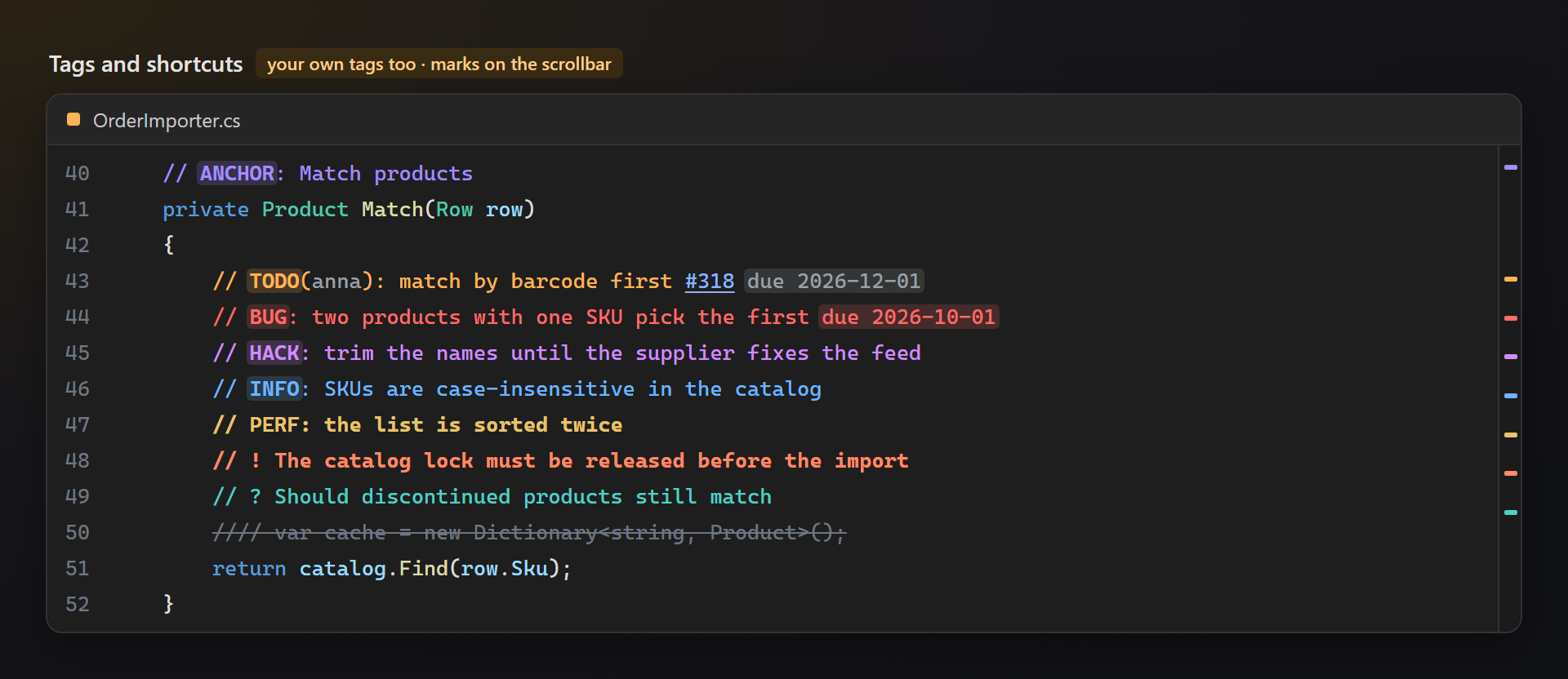
Add REVIEW, PERF or any word your team uses — up to 30 tags, each with a color that reads well in the dark and the light theme.
Free, without strings attached
No subscriptions, no "pro" version, no data collection, no messages in the Output window or at startup. The only thing we will ever ask — after you have used it for a while — is a rating on the Marketplace. Works on Visual Studio 2022 and 2026, x64 and ARM64.
Features
- Colored tags:
TODO,FIXME,BUG,HACK,NOTE,INFOandANCHORat the start of a comment color the whole comment; the tag word is bold on a soft background. - Better Comments shortcuts:
// !marks an important comment,// ?a question,////crossed-out code. - Authors, issues and due dates:
TODO(anna),#142anddue 2026-11-01are recognized; an overdue date turns red. - Comments window: every tagged comment of the solution, grouped by tag, project and file, with chips per tag, an overdue filter and a search box.
- A card on hover: rest the pointer on a tag word to see what it means, the author, how many days are left, and the way to all such comments.
- Anchors:
// ANCHOR: namemarks a part of a long file; Ctrl+K, Ctrl+, lists them and jumps. - Scrollbar marks in the tag color: a long file shows at once where its open questions are.
- Every language with comments: C#, Visual Basic, F#, C++, TypeScript and JavaScript, XAML and XML, HTML, CSS, SQL, Python, PowerShell, Razor and more; dark and light themes.
Tags
A tag counts at the start of a comment and is matched as written: TODO is a tag, todo and TODOS are ordinary words, so normal sentences never light up.
| Tag | Meaning |
|---|---|
TODO | Work still to do. |
FIXME, BUG | Known broken code that has to be fixed. |
HACK | A workaround that should be replaced by a proper solution. |
NOTE, INFO | An explanation worth reading before changing the code. |
ANCHOR | A named place in the file to jump to. |
// ! | An important comment, in bold. |
// ? | An open question. |
//// | Commented-out code, struck through. |
Authors, issues and due dates
In a tagged comment, the name in TODO(anna) is grayed out, #142 is highlighted like a link, and due 2026-11-01 becomes a chip that turns red once the date has passed.
Your own tags
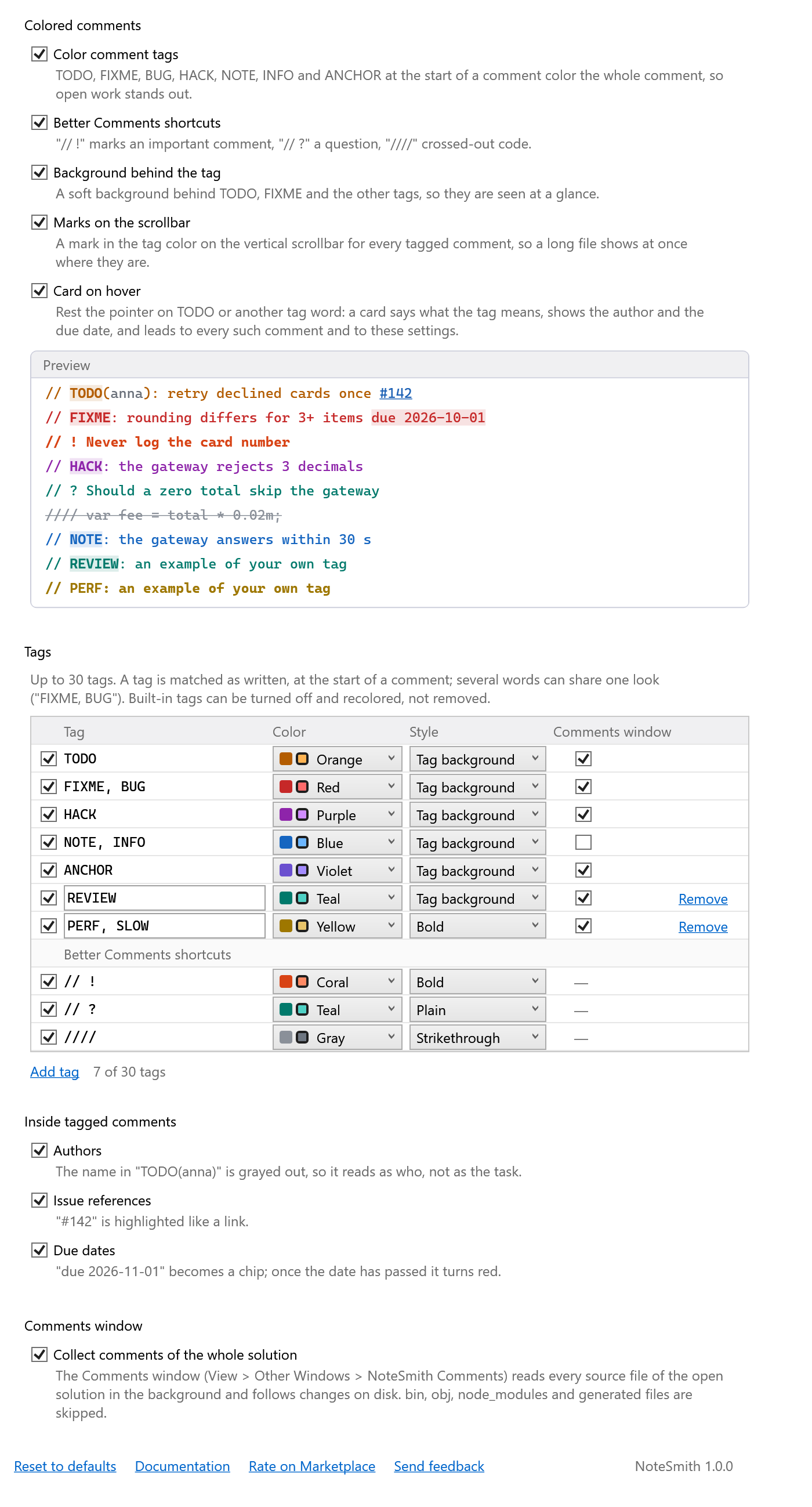
The tag table on the options page holds the built-in tags and your own, up to 30: words separated by commas (PERF, SLOW), a color from 12 pairs made for both themes, a style (tag background, bold, plain, strikethrough) and whether the Comments window collects it. Built-in tags can be turned off and recolored.
Anchors
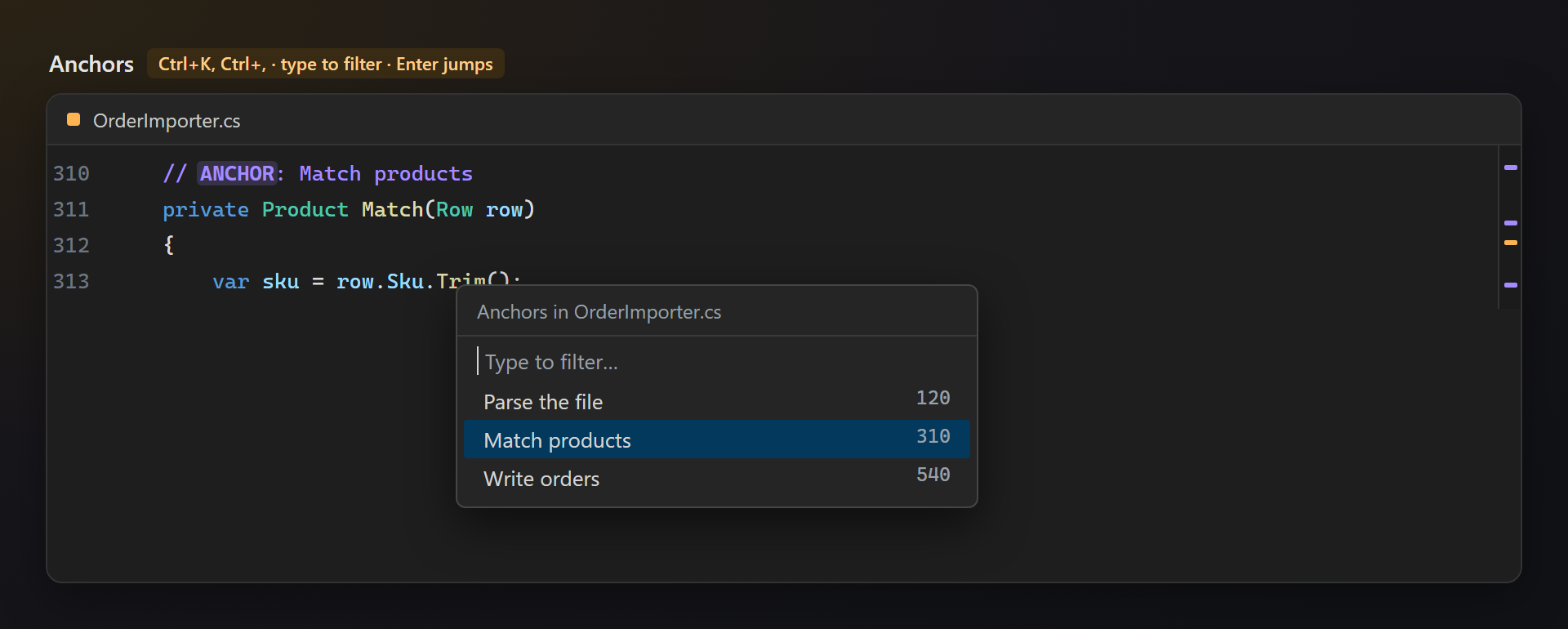
// ANCHOR: name marks a part of a long file. Edit → Go To → NoteSmith Anchors (Ctrl+K, Ctrl+,) lists the anchors of the file at the caret, the part you are in chosen first: type to filter, Enter to jump. Anchors also have their marks on the scrollbar and their group in the Comments window.
Settings
Tools → Options → SmithWorks → NoteSmith. Every option has a description, and the preview at the top shows sample comments with the chosen tags and styles right away.
| Option | Default |
|---|---|
| Color comment tags | on |
| Better Comments shortcuts | on |
| Background behind the tag | on |
| Marks on the scrollbar | on |
| Card on hover | on |
| Tags | 7 built-in tags and 3 shortcuts |
| Authors, issue references, due dates | all on |
| Collect comments of the whole solution | on |
| Ask for a rating on the Marketplace | on |
Settings are stored in %LocalAppData%\NoteSmith.
FAQ
Which languages are colored?
In the editor, every language Visual Studio colors comments in: NoteSmith takes the comments from the editor's own coloring, so it works for C#, Visual Basic, F#, C++, TypeScript, JavaScript, XAML, XML, HTML, CSS, SQL, Python, PowerShell, Razor and others alike. The Comments window, the scrollbar marks and the anchors read files by their extension: .cs, .vb, .fs, C and C++ files, .js, .ts, .xaml, .xml, .html, .css, .scss, .sql, .py, .ps1, .cshtml, .razor, .yml and more.
Why is todo in lower case not colored?
Tags are matched as written, so that the word in an ordinary sentence never lights up. Add Todo or todo to the tag table if your team writes them that way.
How is it different from the Task List?
The Task List of Visual Studio shows only TODO, HACK and UNDONE by default, in plain text. The Comments window shows every tag of the table with its color, groups them, filters by tag, date and text, and keeps up with changes on disk.
Which files does the Comments window read?
Every source file under the folder of the solution (or the open folder), except bin, obj, node_modules, .git, .vs, packages, generated files such as *.Designer.cs and *.g.cs, minified scripts and files larger than 1 MB. Strings that only look like comments ("http://…") are skipped.
Can I change the shortcut of the anchor list?
Yes: Tools → Options → Environment → Keyboard, command Edit.NoteSmithAnchors.
Does NoteSmith send any data?
No. There is no telemetry and no network access; your code stays on your machine.
Where do I report a problem or suggest a feature?
Open an issue in the Feedback repository on GitHub — there are forms for bugs and ideas (please change private names). You can also use the Q&A tab on the Marketplace.
Changelog
1.0.1
- A one-time request for a rating on the Marketplace, after the extension has been useful — with Later and Don't ask again, and an option to turn it off.
1.0.0
- First public release.
Comments window
View → Other Windows → NoteSmith Comments. Every tagged comment of the open solution or folder, grouped by tag, then by project and file. Chips show or hide a tag, overdue keeps only the late ones, the search box filters by text and file. Files are read in the background —
bin,obj,node_modulesand generated files are skipped — and read again when they change on disk. Double-click or Enter opens the line.A card on hover
Rest the pointer on a tag word or a due date: the card says what the tag means, shows the author, the due date with the days left or overdue, the issue and how many such comments the solution has. All TODO comments opens the Comments window with only that tag, Tag settings… opens the options page.