LensSmith
Errors, warnings and messages right at the end of the line they belong to, and the line tinted by the problem. No more hovering over squiggles or looking down at the Error List.
Free · Visual Studio 2022 and 2026 · 14 UI languages · no telemetry
Why LensSmith
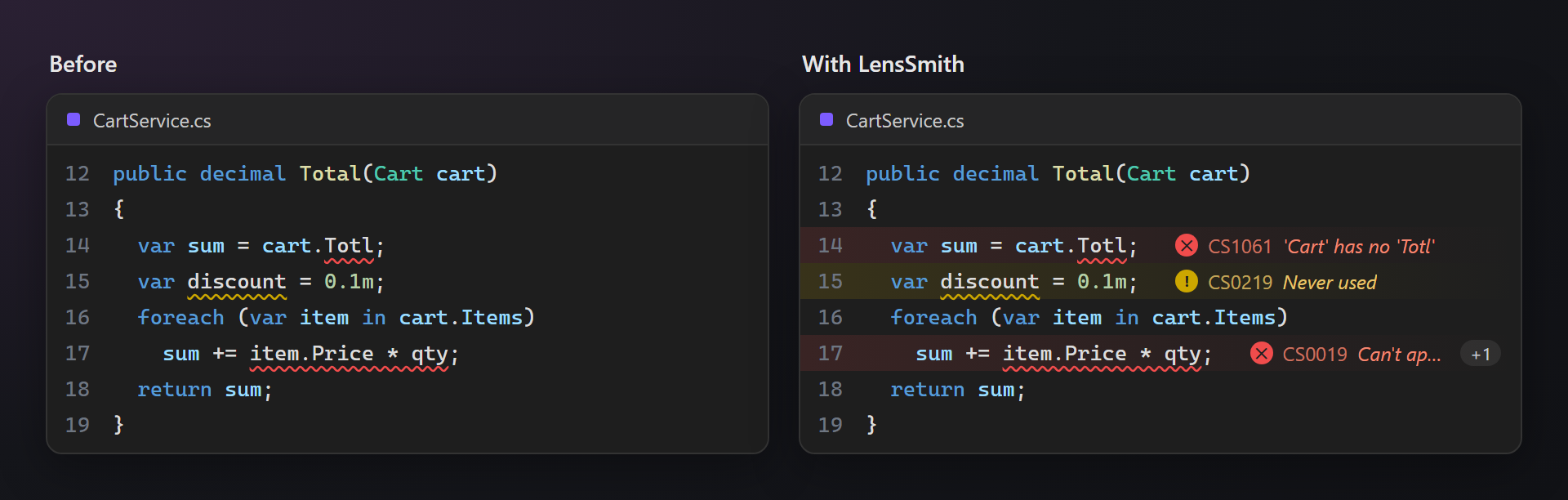
Where you are looking
The message is next to the code it is about. You read what is wrong while you write, without moving the mouse or your eyes.
Quiet while you type
Lines you are editing stay calm until you pause, so half-typed code does not flash errors at you.
Every language with squiggles
C#, Visual Basic, F#, C++, TypeScript — and XAML, where a typo used to show up only at build or run time.
Free, without strings attached
No subscription, no trial, no nag screens, no telemetry. Works on Visual Studio 2022 and 2026, x64 and ARM64.
Features
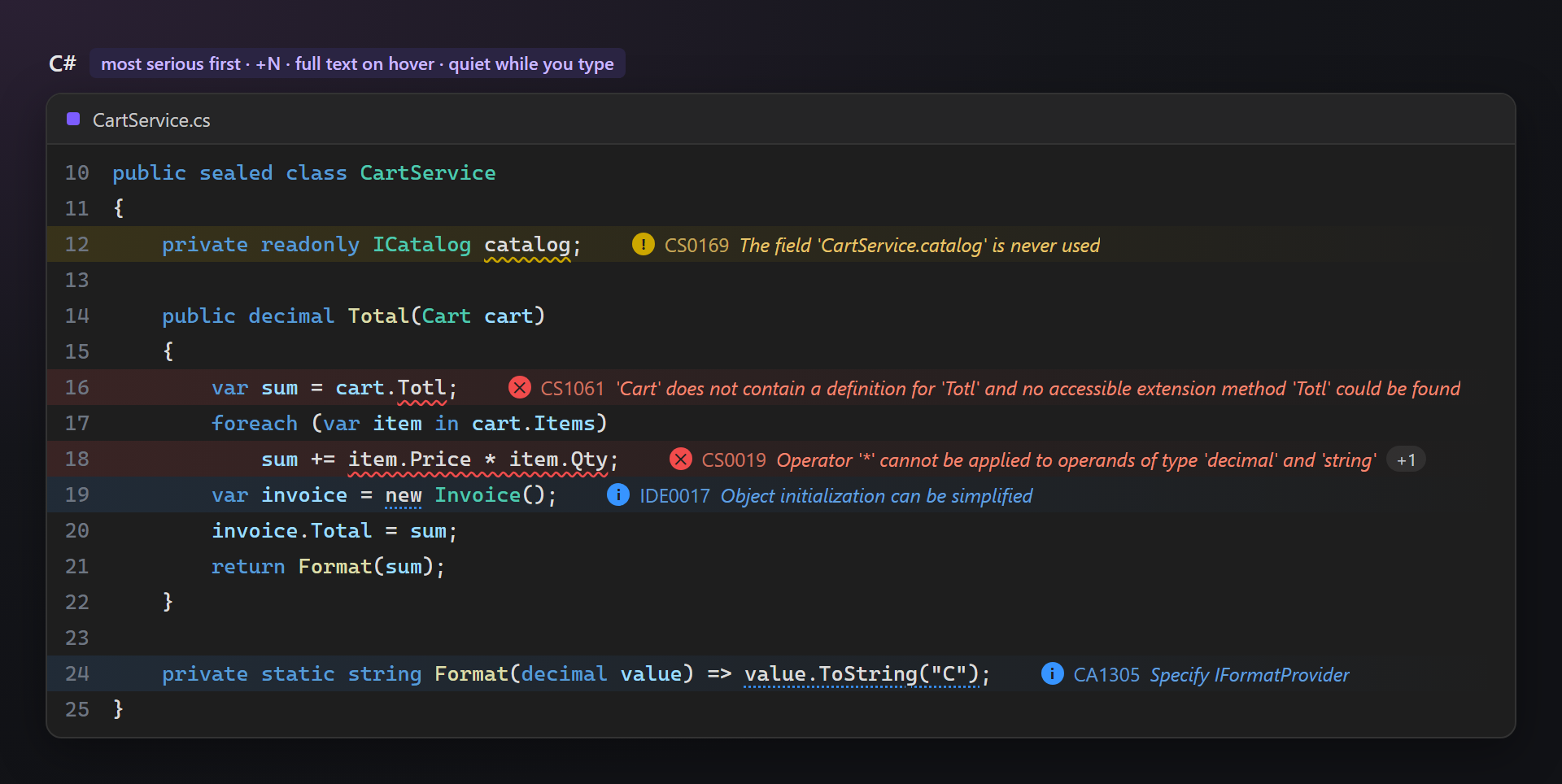
- The message at the end of the line: a round icon, the diagnostic code and the text, in the color of its level — red for errors, yellow for warnings, blue for messages.
- The most serious one first: when a line has several diagnostics, the most serious is shown and
+Ntells how many more there are; duplicates are dropped. - The full text on hover: point at the message to read every diagnostic of the line in full.
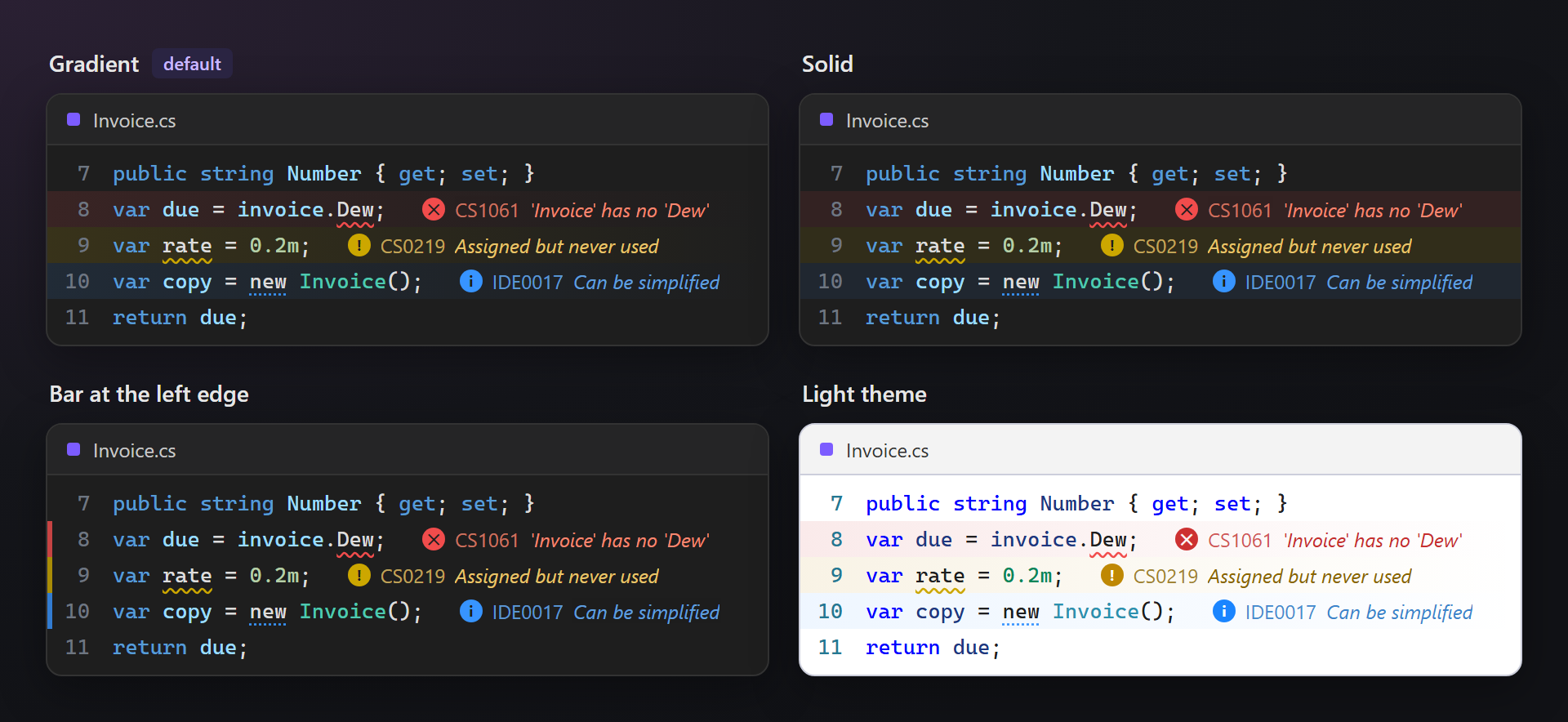
- Line tint: a soft gradient behind the line, fading to the right — problems are visible even while scrolling. Solid and bar styles for themes where the gradient is hard to see.
- Quiet while you type: edited lines wait for a short pause before their messages appear.
- Fits the window: long texts are shortened with “…” at a word, also when the window is narrow; a compact mode shows only the code.
- Hidden codes: diagnostics you do not want to see inline (for example
IDE0008) are skipped; they stay in the Error List. - Build errors in other files: files that nothing checks while you edit them —
.idl, CMake lists,.props— show the errors of the last build from the Error List. - Dark and light themes: the colors follow the theme of Visual Studio.
Where it works
| Editor | Where the messages come from |
|---|---|
| C#, Visual Basic, F# | compiler and analyzer diagnostics (CS…, BC…, IDE…, CA…) |
| C++ | IntelliSense errors and warnings |
| TypeScript, JavaScript | language service diagnostics (TS…) |
| XAML | the Error List (XLS…, XDG…): the XAML editor shows its squiggles without text |
| Other editors | any editor where Visual Studio draws squiggles |
| IDL, CMake, MSBuild and similar | errors of the last build, from the Error List |
In the code
Each line shows its most serious problem. Messages (suggestions such as IDE0017) are blue and quieter than errors and warnings, so they do not drown them out.
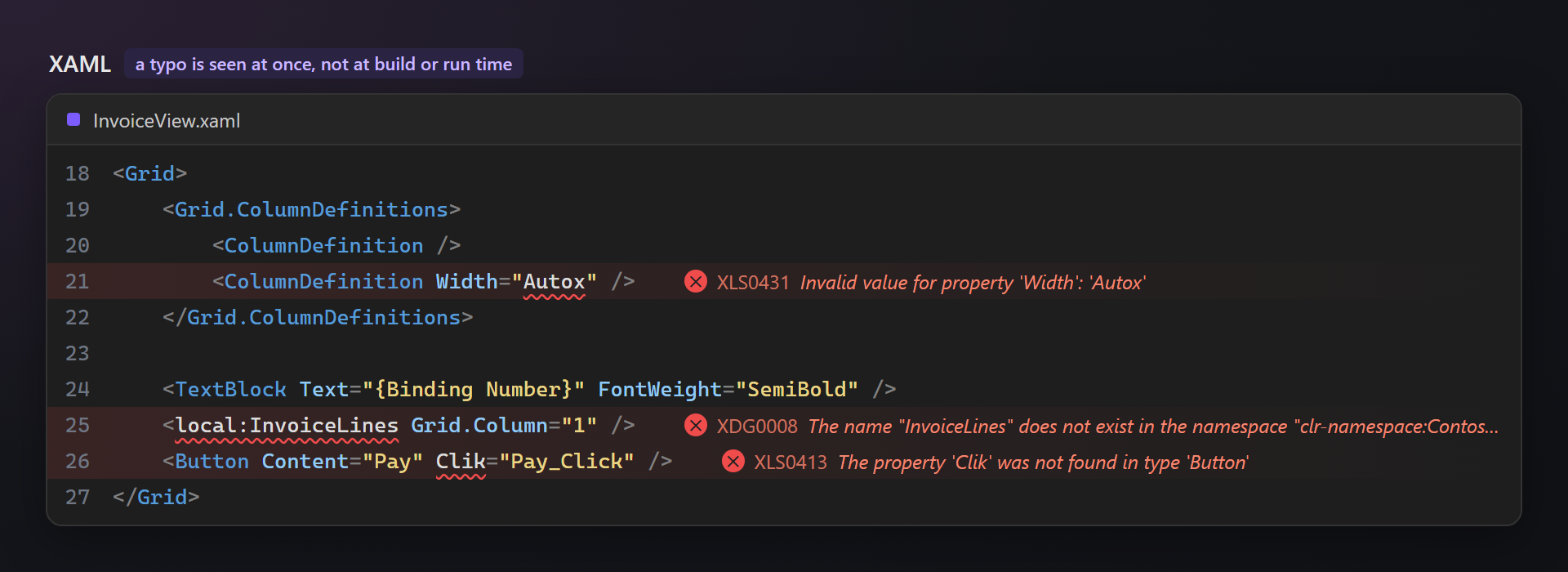
XAML
A wrong property value, an unknown type, a typo in a binding — the XAML editor underlines them, but the text used to hide in the Error List. LensSmith writes it next to the line, so a mistake is seen right away, not at build or run time.
Line tint
Three styles and three strengths, because dark themes are all different: a gradient (default), a solid tint, or only a narrow bar at the left edge that leaves the code background untouched. Each level can be tinted or not.
Settings
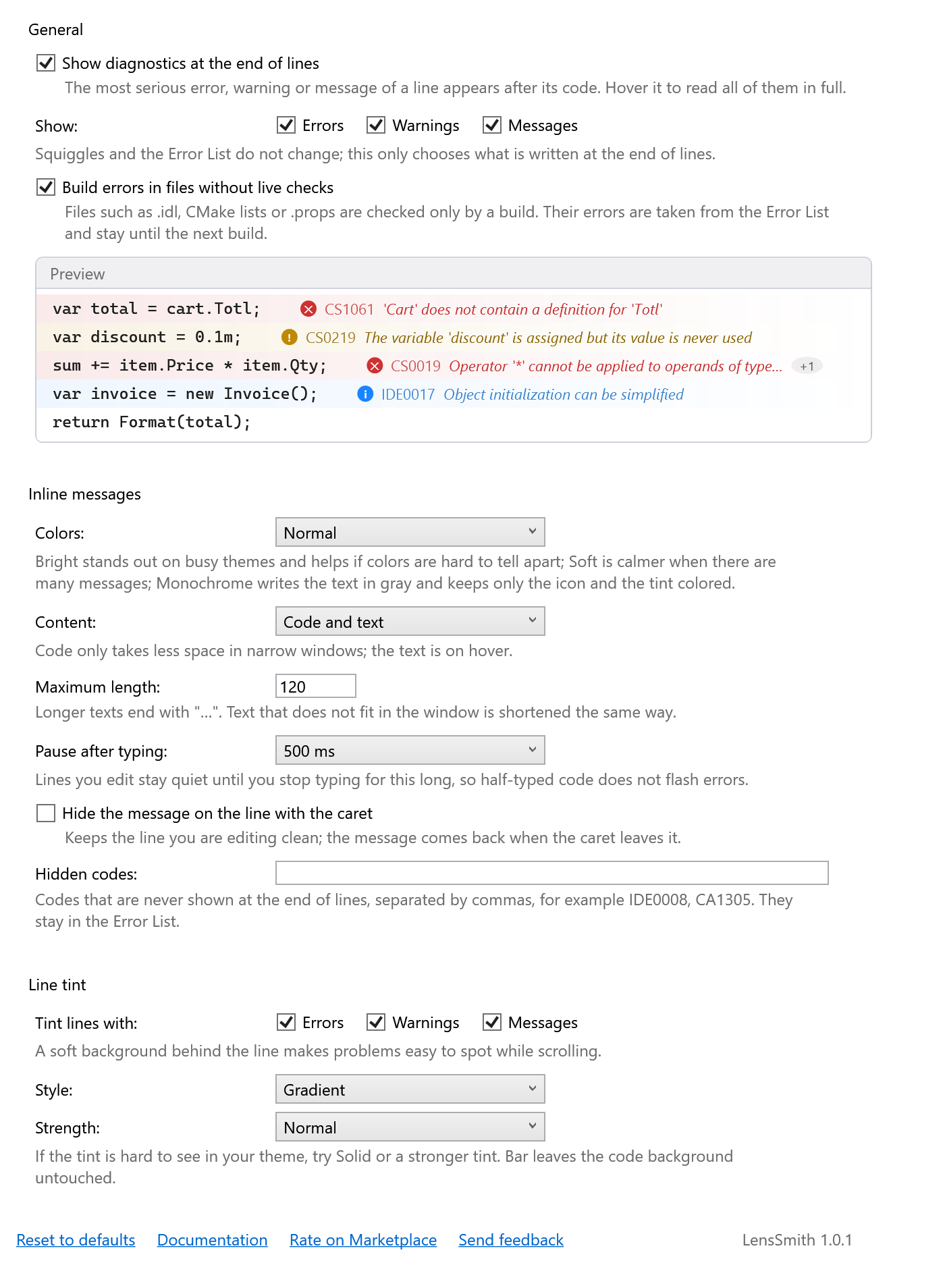
Tools → Options → SmithWorks → LensSmith. Every option has a description, and the preview at the top shows the result right away.
| Option | Default |
|---|---|
| Show Diagnostics at the End of Lines | on |
| Show: Errors, Warnings, Messages | all on |
| Build Errors in Files Without Live Checks | on |
| Colors | Normal |
| Content | Code and text |
| Maximum Length | 120 |
| Pause After Typing | 500 ms |
| Hide the Message on the Line with the Caret | off |
| Hidden Codes | — |
| Tint Lines With: Errors, Warnings, Messages | all on |
| Style | Gradient |
| Strength | Normal |
Settings are stored in %LocalAppData%\LensSmith.
FAQ
Does it replace the Error List?
No. LensSmith only shows what Visual Studio already reports; the squiggles, the Error List, quick actions and builds work as before.
Why does a line have a tint but no text?
Its squiggle carries no text, and the Error List has no entry for that line either — for example when the Error List shows only the current document or hides warnings. The text then appears when the Error List has it.
Why does a message appear a moment after I stop typing?
That is the pause after typing: edited lines stay quiet for 500 ms so half-typed code does not flash errors. It can be shorter or turned off in the settings.
There are too many messages. What can I do?
Turn off Messages in “Show”, hide single codes such as IDE0008 in “Hidden codes”, or switch the content to “Code only”.
Does it slow down large files?
No. Only visible lines are read and drawn, and nothing is drawn for lines without diagnostics.
Does LensSmith send any data?
No. There is no telemetry and no network access.
Where do I report a problem or suggest a feature?
Open an issue in the Feedback repository on GitHub — there are forms for bugs and ideas (please change private names). You can also use the Q&A tab on the Marketplace.
Changelog
1.0.2
- Messages stand after the resource values of LocaleSmith on the same line instead of on top of them.
1.0.1
- “Rate on Marketplace” link in the settings.
1.0.0
- First public release.