ImageSmith
Pictures right where the code mentions them: rest the pointer on a path and a card shows the picture, its pixel size and file size. SVG is drawn, every size inside an .ico is there, animated GIFs play — and the same card replaces the preview in Solution Explorer.
Free · Visual Studio 2022 and 2026 · 14 UI languages · PNG, JPEG, GIF, BMP, TIFF, ICO, WebP, SVG
Why ImageSmith
See the picture, not its name
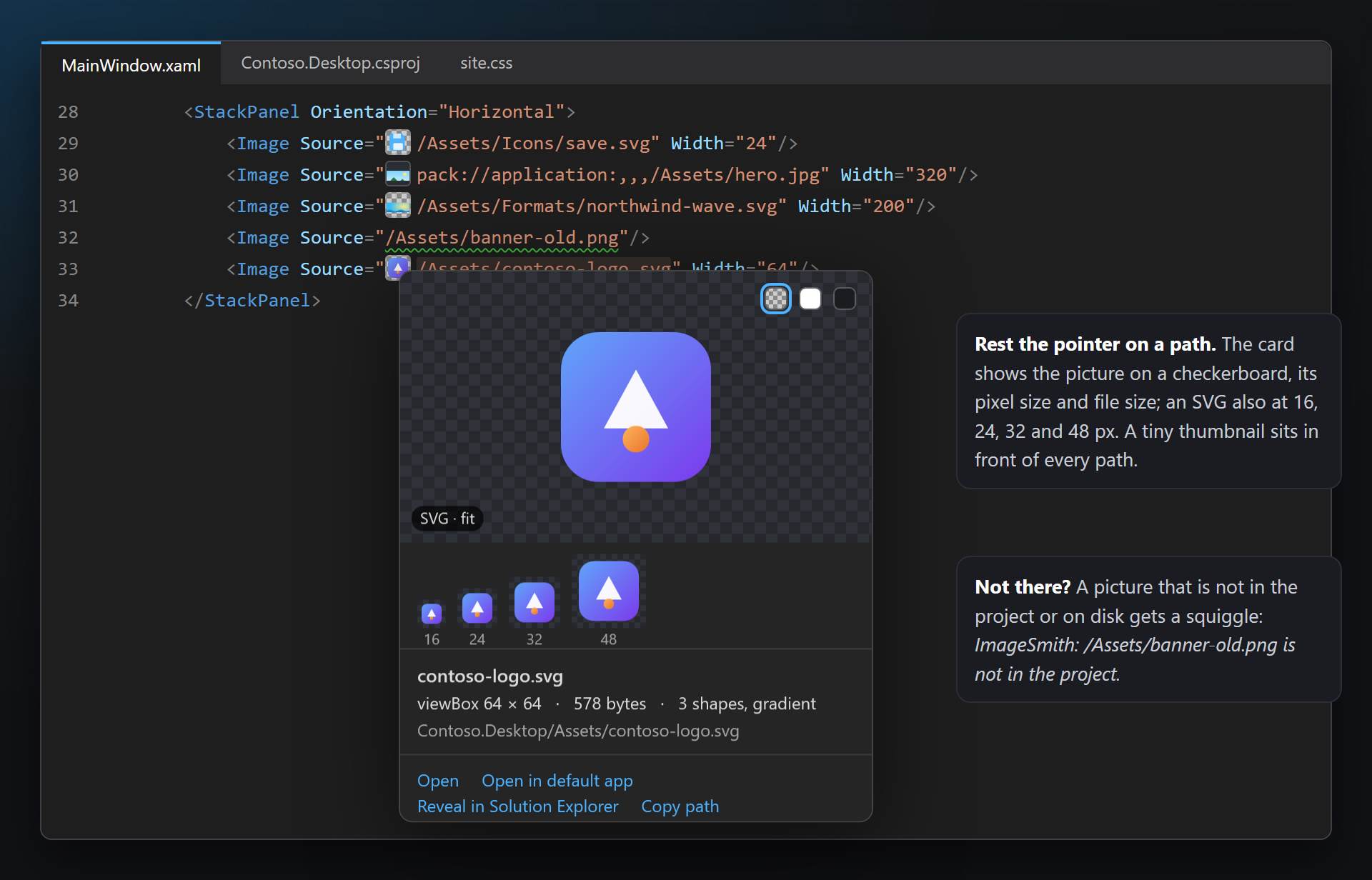
/Assets/Icons/save.svg says little. ImageSmith shows the picture itself, right where the path is written — in XAML, Razor, CSS, C#, JSON, project files and .resx — without opening the file.
SVG and .ico included
Visual Studio shows nothing for SVG and only one size of an icon. ImageSmith draws the SVG, lists every image inside an .ico and plays animated GIFs.
Missing pictures stand out
A path to a picture that is not in the project or on disk gets a squiggle, and an application icon without the sizes Windows needs gets a hint — before a user sees an empty image or a blurry icon.
Free, without strings attached
No subscriptions, no "pro" version, no data collection, no messages in the Output window or at startup. The only thing we will ever ask — after you have used it for a while — is a rating on the Marketplace. Works on Visual Studio 2022 and 2026, x64 and ARM64.
Features
- A card on hover over a path: the picture on a checkerboard, its pixel size, file size and format, how large the code shows it (shown at 20%) and actions — Open, Open in default app, Reveal in Solution Explorer, Copy path.
- The same card in Solution Explorer instead of the built-in preview, with Copy picture.
- SVG drawn, also at 16, 24, 32 and 48 px — how it will look on a button.
- Every size of an .ico with its colors and format; Save all sizes as PNG, Save as PNG per size, Copy selected size.
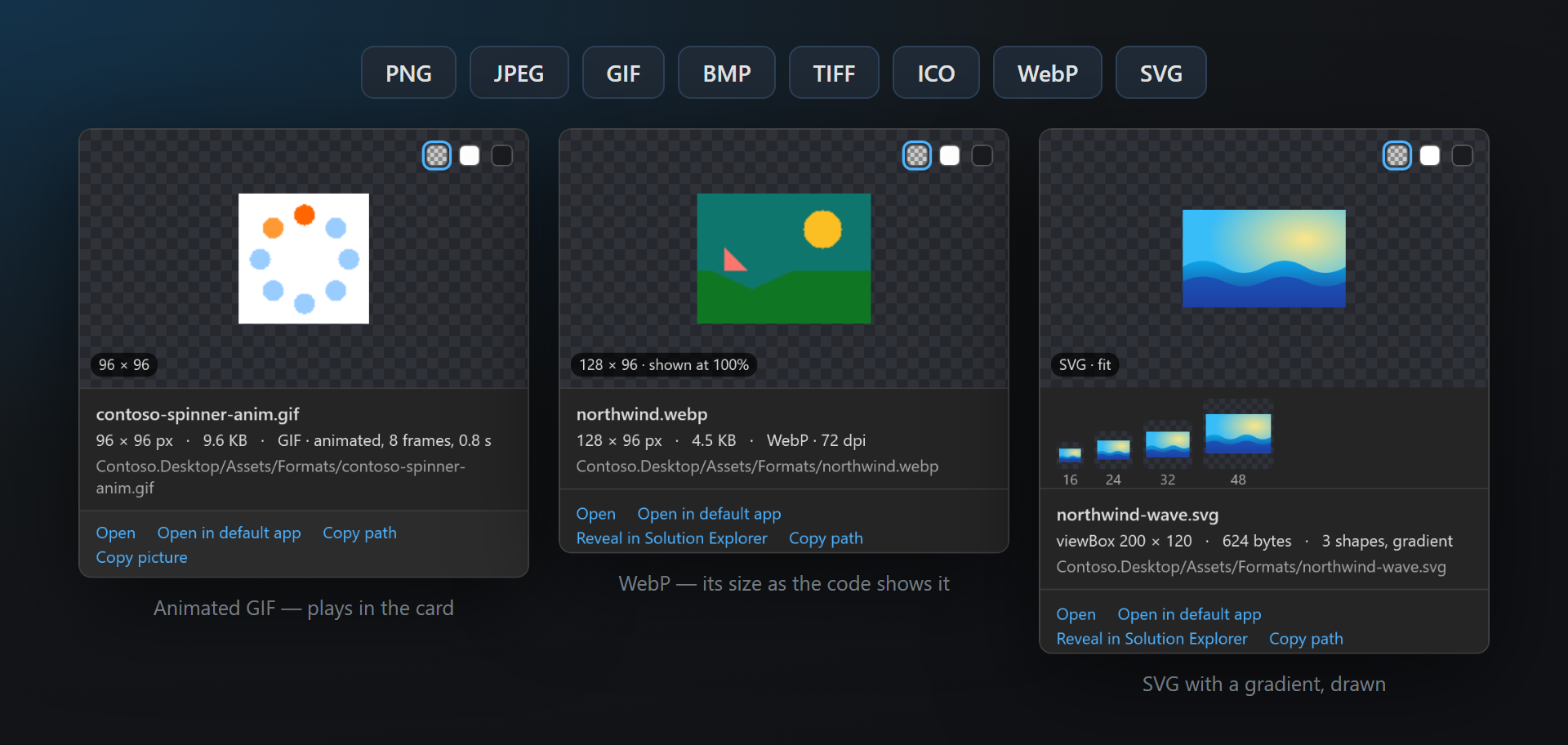
- Animated GIFs play in the card, with the number of frames and the length.
- Scale variants side by side:
_x2,_x1_25,@2x,.scale-200,.targetsize-24,-480. - Thumbnails in front of the paths, like color swatches.
- Hints: Picture not found and Icon without the usual sizes.
- PNG, JPEG, GIF, BMP, TIFF, ICO, WebP and SVG; a checkerboard, white or dark background behind the picture.
The card in code
Rest the pointer on a picture path and the card opens in the Quick Info tooltip of the editor. It shows what is in the file on disk, as the project would find it: a relative path from the file's folder or the project, a root path from the project (or wwwroot), a pack URI from the project of that assembly.
| Part | What it shows |
|---|---|
| Picture | The picture on a checkerboard (transparency is visible), small pictures enlarged with sharp pixels, large ones fitted. Three buttons in the corner switch the background. |
| Size badge | The pixel size, and when the same tag sets Width or Height, how large the code shows it: 1600 × 1000 · shown at 20%. For an SVG: SVG · fit. |
| Facts | File name, pixel size, file size, format and DPI (when it is not 96); for an SVG the viewBox, the number of shapes and whether it has gradients or text; the path in the solution. |
| Actions | Open (in Visual Studio), Open in default app, Reveal in Solution Explorer, Copy path. |
Checkerboard, white or dark
A white logo on a white card disappears. The three buttons at the top right of the picture switch between a checkerboard, white and dark; the choice holds until Visual Studio is closed. The background a card starts with is an option.
Thumbnails in front of paths
Each path whose file exists gets a tiny picture in front of it, as tall as the line — like a color swatch. A file list of icons can be read at a glance. Turn them off for a quieter editor.
Solution Explorer
Rest the pointer on a picture file in Solution Explorer: the ImageSmith card opens beside it instead of the built-in preview. SVG is drawn (the built-in preview shows nothing), an .ico shows every size (the built-in preview shows one), and the scale variants of the picture are lined up under it.
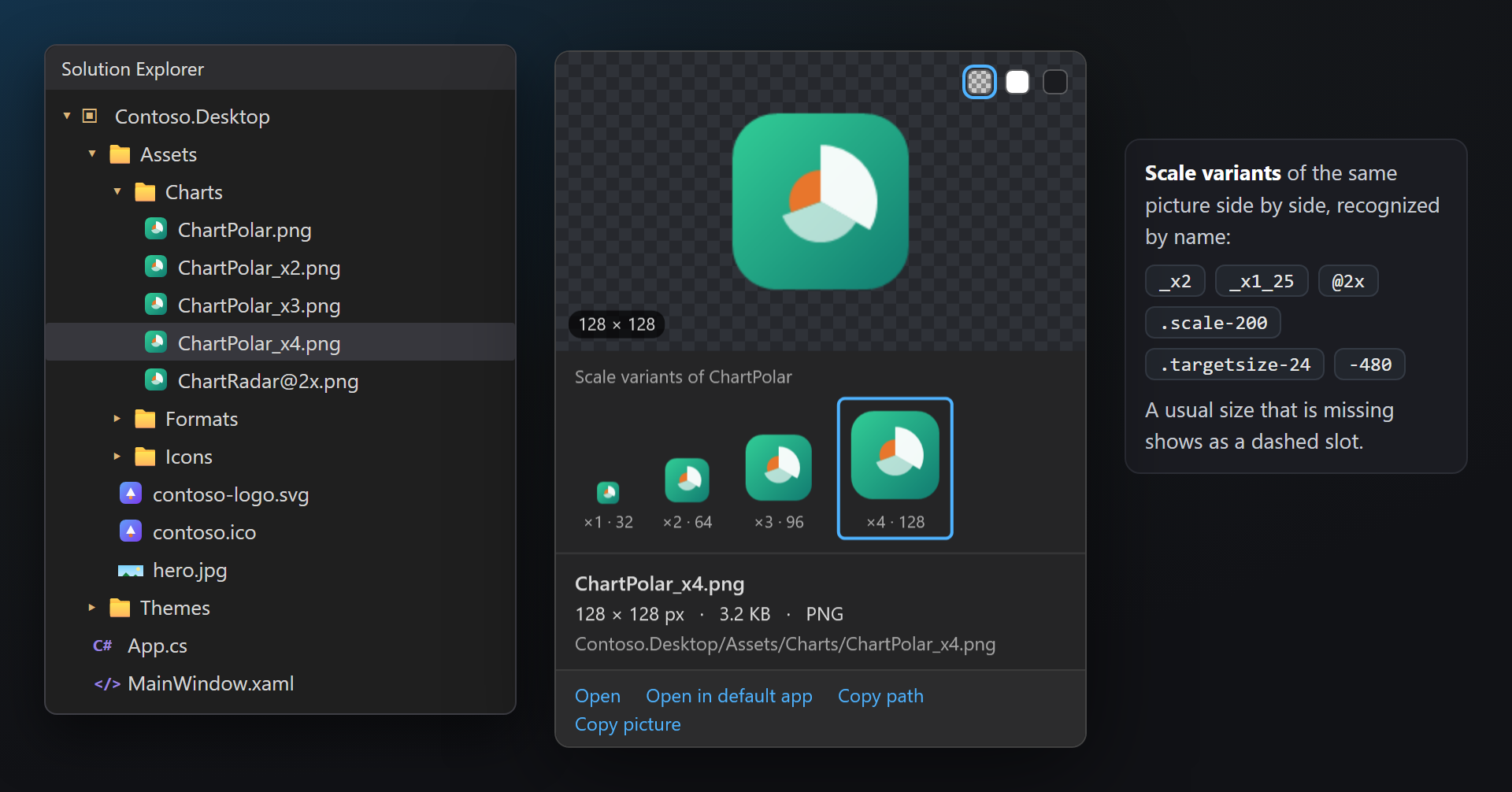
The card stays while the pointer is over the item or over the card, so its links can be clicked — here they are Open, Open in default app, Copy path and Copy picture. It closes on leaving, scrolling, a key or a click in the tree.
Folders, code files and anything ImageSmith does not show keep the built-in tooltip. If a Visual Studio update changes Solution Explorer so the item under the pointer cannot be found, ImageSmith stays out of the way.
Icons (.ico)
An .ico file holds several pictures, one per size. The card of an .ico shows all of them side by side on the checkerboard (sizes above 128 px are shown at 128) and a table with each size, its colors, whether it is stored as BMP or PNG, and its bytes.
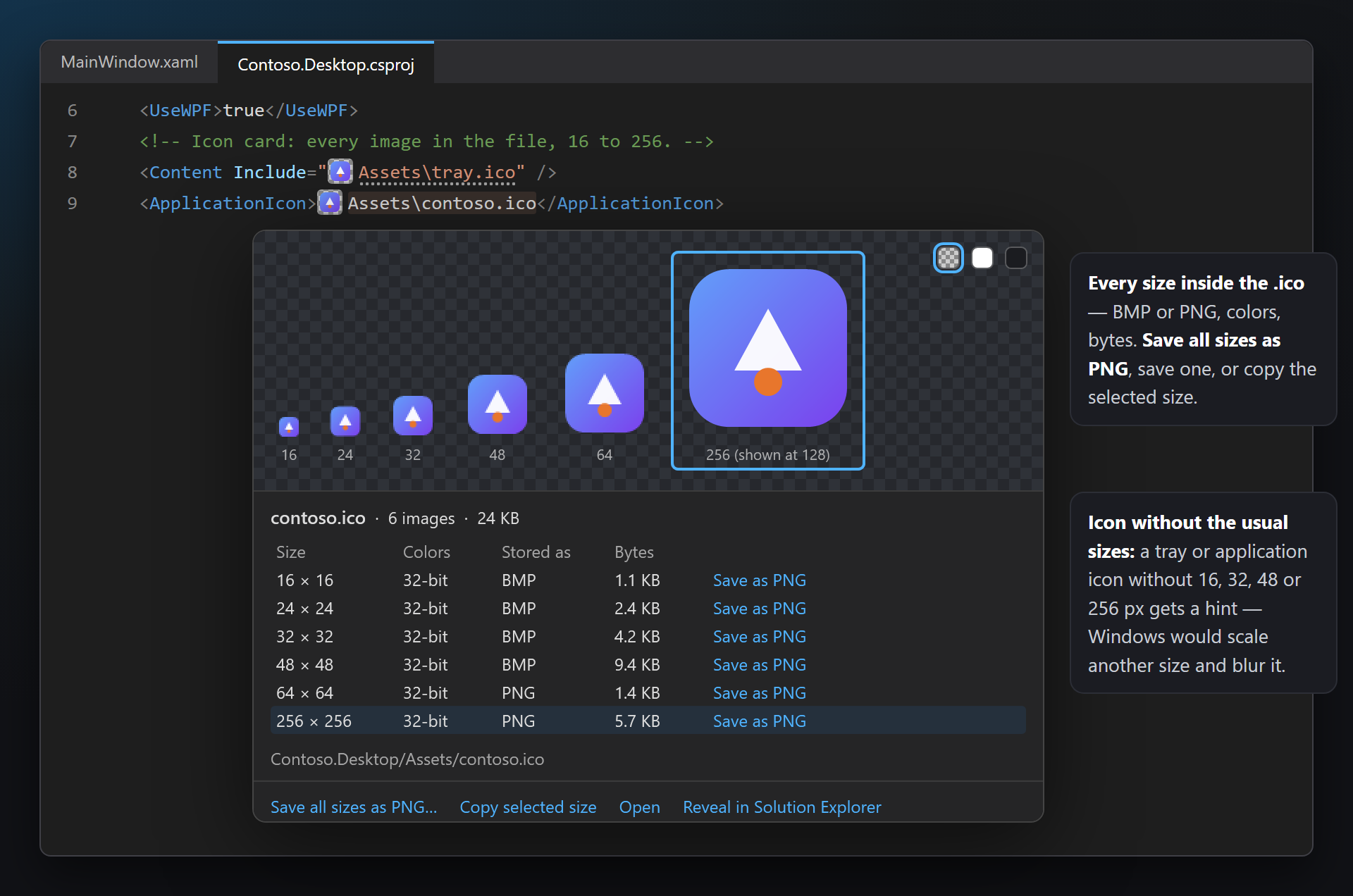
Click a size — in the strip or in the table — to select it. Copy selected size puts that image on the clipboard.
Save as PNG in a row writes that size to a PNG file; Save all sizes as PNG… asks for a folder and writes one PNG per size (contoso-16.png … contoso-256.png).
SVG
SVG files are drawn — in the card in code, in Solution Explorer and in the thumbnails — with SharpVectors. Under the picture the card shows it at 16, 24, 32 and 48 px: how it will look on a toolbar button.
The facts are the viewBox (or the width × height when there is no viewBox), the file size and the number of shapes, with gradient and text when the file has them. An SVG that cannot be drawn shows the line of the error instead of a picture.
External files and URLs referenced from an SVG are never loaded.
Animated GIF
An animated GIF plays in the card, looping, and the facts say how many frames it has and how long it runs: GIF · animated, 8 frames, 0.8 s. A GIF with one frame stays still. WebP, TIFF and BMP are shown like PNG and JPEG.
Scale variants
Pictures often come in several scales for high-DPI screens. When the files sit next to each other, the card lines them up under the picture, each drawn in proportion with its scale and pixel size (×2 · 64); the one shown is outlined. A usual scale that is missing is a dashed slot.
| Naming | Example | Dashed slot when missing |
|---|---|---|
| Multiplier (WinForms, report designers) | Chart.png, Chart_x2.png, Chart_x1_25.png, Chart_x1.5.png | ×1, ×2 |
| @2x (web, iOS, React Native) | Chart.png, Chart@2x.png | ×1, ×2 |
| scale- (UWP, WinUI, MSIX) | Logo.scale-100.png, Logo.scale-200.png | 100, 200 |
| targetsize- (UWP, WinUI, MSIX) | Square44x44Logo.targetsize-24.png | 16, 24, 32, 48 |
| Size suffix | icon-16.png, icon-32.png, tent-480.jpg, tent-768.jpg | — |
Click a variant to see it in the same card. The row is in the card in code and in Solution Explorer.
What is recognized
A path is recognized by the extension of a picture file, in the places where each language names files:
| Where | Examples |
|---|---|
| XAML (WPF, WinUI, MAUI, Avalonia) | Source="/Assets/logo.png", pack://application:,,,/Contoso;component/Icons/save.svg, /Contoso.Icons;component/…, ms-appx:///Assets/hero.jpg, avares://Contoso.App/Assets/logo.png |
| Razor, Blazor and HTML | <img src="~/images/tent.jpg">, srcset, <link rel="icon">, style="background: url(…)" |
| CSS, SCSS, LESS | url("../images/hero.webp"), url(…) without quotes, image-set(…) |
| C# | "Assets/hero.jpg", @"Assets\splash.png", new Uri("pack://…"), Path.Combine("Assets", "logo.svg") |
| JSON | "icon": "images/icon-192.png" (appsettings.json, manifest.json) |
| Project files | <ApplicationIcon>, <Resource Include="…">, <Content Include="…">, MAUI and appxmanifest images |
| .resx | A ResXFileRef to a picture, and a plain string value that is a picture path. |
| Formats | PNG, JPEG, GIF, BMP, TIFF, ICO, WebP, SVG |
Pack URIs to another project of the solution (/Contoso.Icons;component/Icons/save.svg, with or without a version) are looked up in that project. ms-appx:/// also finds the qualified files of UWP and WinUI (Logo.scale-200.png for Logo.png); a MAUI logo.png finds Resources/Images/logo.svg.
Not shown, on purpose: URLs and data: URIs, bindings and resources ({Binding …}, {StaticResource …}), interpolated strings and paths built from variables, MSBuild properties, wildcards, pack://siteoforigin:, and bare file names in C# ("logo.png" could be anything).
Hints
Two kinds of hints, shared with the SmithWorks family: each text starts with ImageSmith:, its tooltip has Don't show this kind of hint, and with LensSmith the hint also shows at the end of the line.
| Hint | When | Text |
|---|---|---|
| Picture not found | A path to a picture that is not in the project or on disk (a squiggle). URLs, paths with variables and bare file names in code are not checked. | ImageSmith: /Assets/banner-old.png is not in the project. |
| Icon without the usual sizes | An application or tray .ico without 16, 32, 48 or 256 px (gray dots): Windows scales another size and it looks blurry. Favicons are not checked. | ImageSmith: tray.ico has no 16 × 16 image — Windows will scale a larger one. |
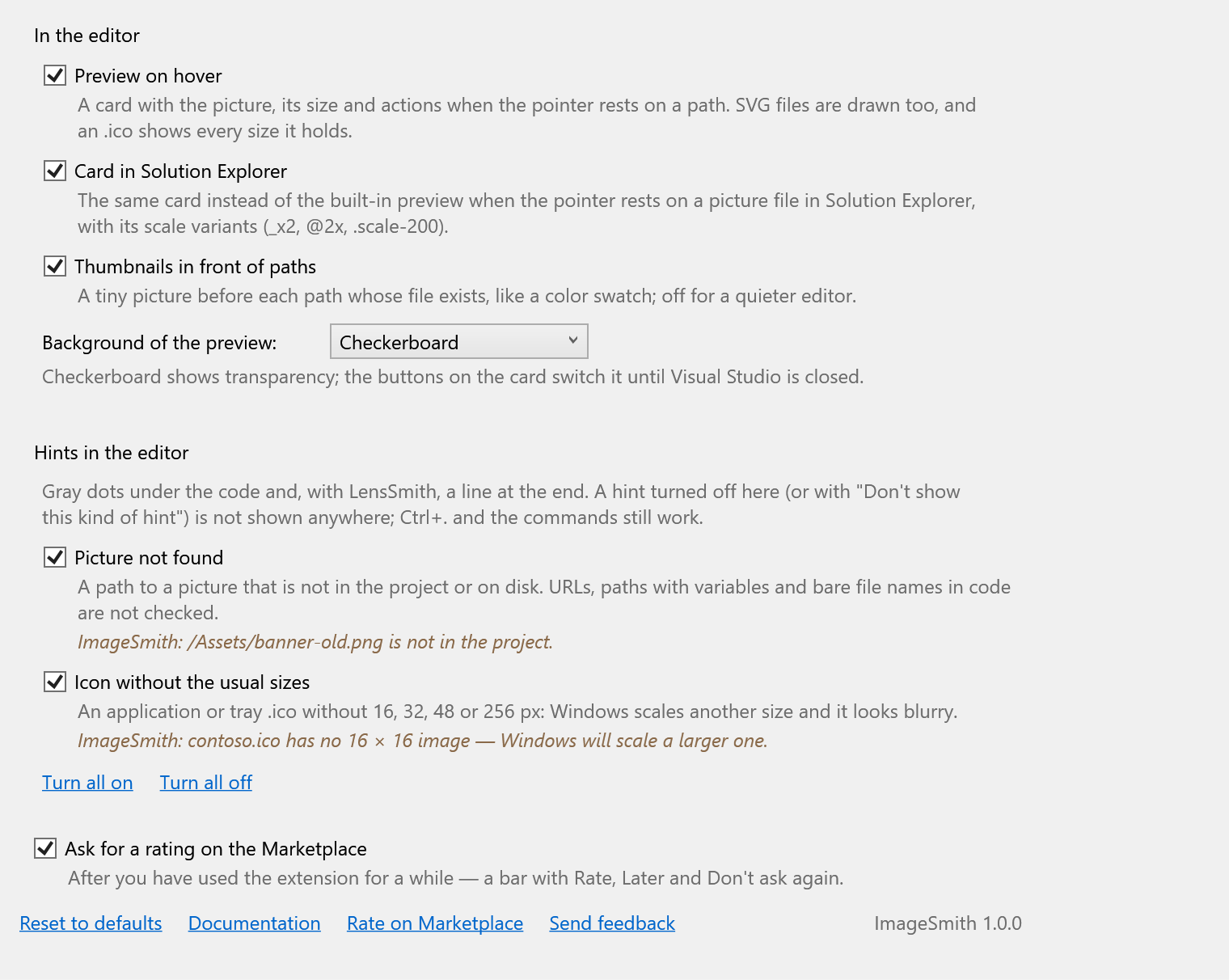
Each kind can be turned off under Hints in the editor in the settings, or right from the hint.
Settings
Tools › Options › SmithWorks › ImageSmith. Every option has a short description of what it does.
| Option | Default |
|---|---|
| Preview on hover | On |
| Card in Solution Explorer | On |
| Thumbnails in front of paths | On |
| Background of the preview | Checkerboard |
| Hints: Picture not found | On |
| Hints: Icon without the usual sizes | On |
| Ask for a rating on the Marketplace | On |
Settings are stored in %LocalAppData%\ImageSmith. Reset to defaults turns everything back on.
FAQ
I rest the pointer on a path and nothing opens. Why?
ImageSmith shows a card only for a file it finds on disk. Check that the path ends with a picture extension and is not built from variables, a binding or a URL (those are never shown). If the file is missing, the path should have a Picture not found squiggle instead. Bare file names in C# ("logo.png") are skipped on purpose — only paths with a folder or a pack URI are read there.
Why is there nothing for avares://OtherAssembly/…?
An avares:// or pack URI names an assembly. When that assembly is a project of the open solution, ImageSmith looks in that project. When it comes from a NuGet package or a referenced DLL, the picture is compiled into it and is not a file on disk — so there is nothing to show, and ImageSmith does not report it as missing either.
My SVG has a wrong or missing namespace. Is it drawn?
Yes. Files saved with xmlns="http://w3.org" or without any namespace are common; ImageSmith puts the SVG namespace right before drawing, so the card shows the picture. Browsers may still refuse such a file, so it is worth fixing.
The card says it cannot draw this SVG. What now?
The card shows the first line of the error (for example an XML error with its line and column). Fix the file and rest the pointer on the path again — a changed file is read again.
Can I keep the built-in preview in Solution Explorer?
Yes — turn off Card in Solution Explorer in the settings. The card in code stays.
Does a large picture slow the editor down?
No. Pictures are decoded on a background thread and only at the size the card needs; thumbnails are decoded small. Files over 256 MB (SVG over 8 MB, ICO over 16 MB) show their facts without a picture.
Does ImageSmith send anything anywhere?
No. It reads the picture files of your solution on your computer and nothing else — no telemetry, no requests, and an SVG never loads anything from the internet.
Where do I report a problem or suggest a feature?
Open an issue in the Feedback repository on GitHub — there are forms for bugs, ideas and paths that are not recognized (please change private names). You can also use the Q&A tab on the Marketplace.
Changelog
1.1.0
- A new icon, drawn in the one style of the SmithWorks family.
1.0.0
- First release: the card on hover over picture paths in XAML, Razor and HTML, CSS, C#, JSON, project files and .resx; the card in Solution Explorer with scale variants; SVG drawn, every size of an .ico, animated GIFs; thumbnails in front of paths; the hints Picture not found and Icon without the usual sizes; a one-time request for a rating.