ColorSmith
Color swatches and a real color picker for the Visual Studio editor. A swatch appears only where the code really defines a color — never on the word “red” in a page text or on #123 in a comment.
Free · Visual Studio 2022 and 2026 · 14 UI languages · no telemetry
Why another color extension
Smart detection
Every language has its own lexer: strings, comments and code are told apart. A color name gets a swatch only in a color context (Foreground="Red", color: red), not in plain text.
A picker worth opening
HEX, RGB, HSL and OKLCH, eyedropper with a loupe, tints and shades, colors of the file, favorites, WCAG contrast. The result is written back in the notation the code already uses.
Free, without strings attached
No subscription, no trial, no nag screens, no telemetry. Settings stay on your machine.
Speaks your language
English, Czech, German, Spanish, French, Italian, Japanese, Korean, Polish, Portuguese (Brazil), Russian, Turkish, Chinese (Simplified and Traditional). Follows the Visual Studio language.
Features
- Swatches in the editor for hex colors, CSS functions (
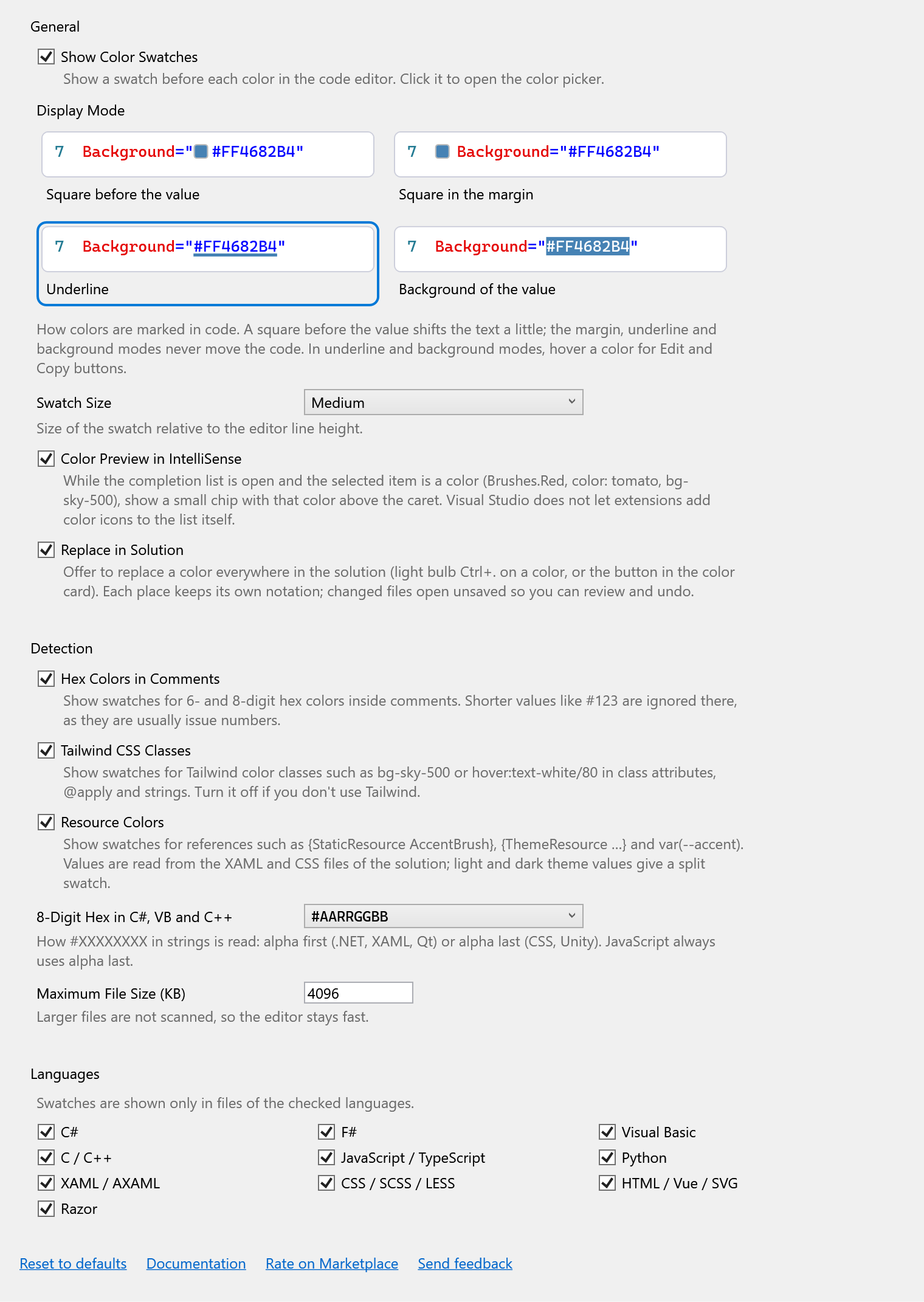
rgb(),hsl(),hwb(),oklch(),oklab()), named colors, .NET members (Colors.Red,Brushes.Teal,SKColors.Gold) and calls with literal arguments (Color.FromArgb(255, 61, 139, 255),new Color32(…),QColor(…),RGB(…)). - Four display modes: a square before the value, a square in the margin, an underline (default) or the value's own background. Only the first one moves the text.
- Click a swatch to open the picker; the edit replaces the value in place, keeping its notation.
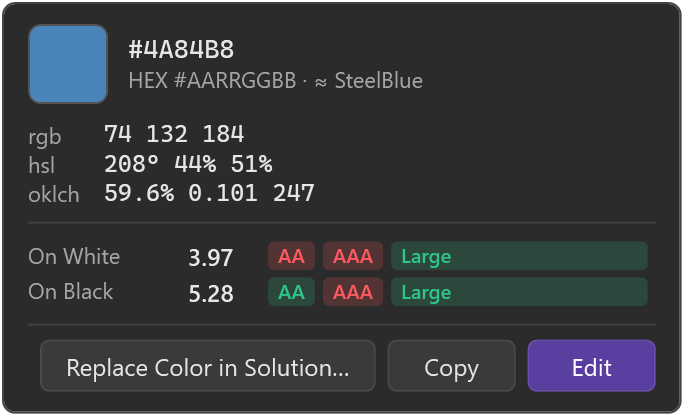
- Color card on hover: values in several spaces, the nearest named color and contrast on white and black.
- Composite values: CSS
light-dark()(split swatch),color-mix()(computed result), CSS gradients and XAML gradient brushes. - Resources:
{StaticResource AccentBrush},{DynamicResource …},{ThemeResource …}andvar(--accent)are resolved from the XAML and CSS files of the solution; light and dark theme values give a split swatch. - Tailwind CSS color classes:
bg-sky-500,hover:text-white/80,bg-[#1da1f2]. - Replace in solution: change one color everywhere, each place in its own notation, with an optional “similar shades” search.
- IntelliSense preview: while the completion list has a color selected, a chip with that color shows above the caret.
Languages
| Language | What gets a swatch |
|---|---|
| C#, Visual Basic, F# | hex strings, Colors.X / Brushes.X / Color.X, Color.FromArgb / FromRgb with literals, Unity Color / Color32, SkiaSharp, MAUI |
| C / C++ | hex strings, RGB(), D2D1::ColorF, QColor, IM_COL32 |
| JavaScript / TypeScript | hex and CSS strings, names assigned to color targets (fillStyle = 'red'), new THREE.Color(), Tailwind classes in JSX |
| Python | hex strings, matplotlib "tab:blue", QColor(…), names only as color arguments (color="red", Tkinter bg=) |
| XAML / AXAML | color properties, setters, <Color> resources, gradient brushes, resource references, MAUI AppThemeBinding |
| CSS / SCSS / LESS | declaration values only, variables, light-dark(), color-mix(), gradients, var() |
| HTML / Vue / SVG / Razor | style attributes, color attributes, <style> and <script> blocks, Razor C# blocks, Tailwind classes |
Color picker
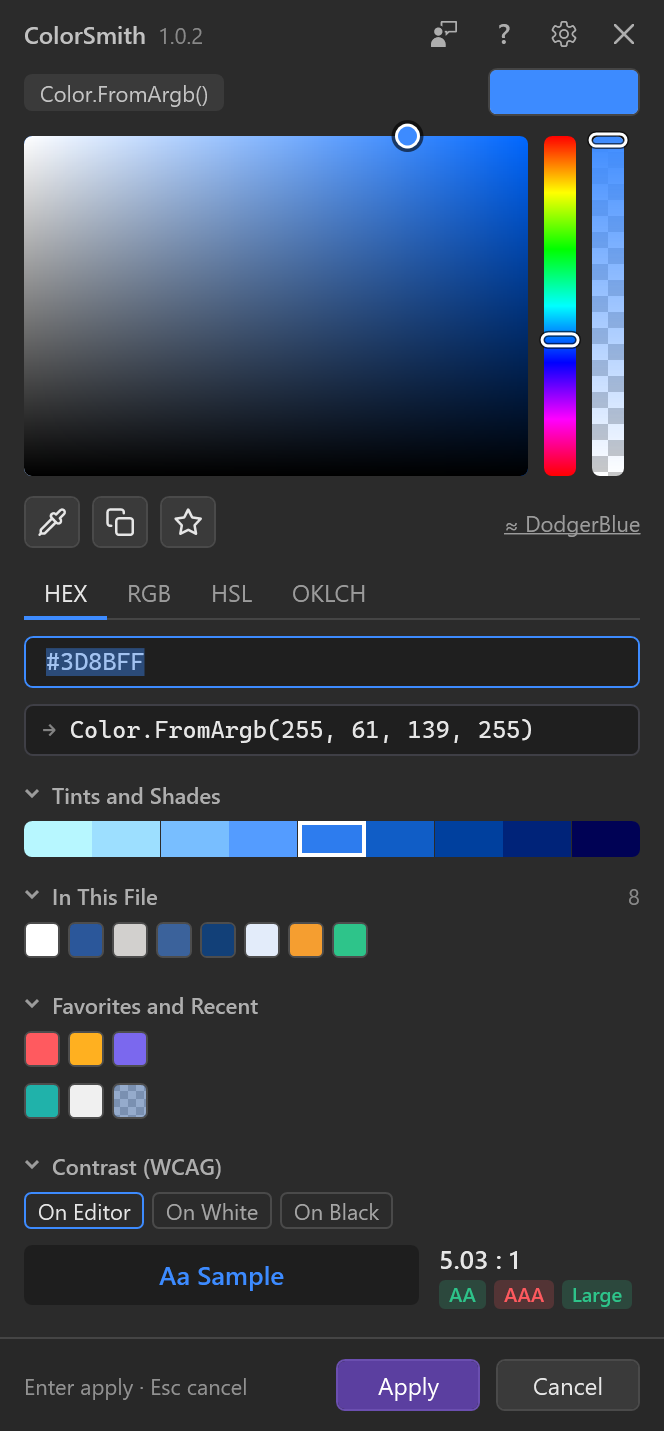
Click a swatch, or Edit in the color card. The picker opens next to the value and shows which notation it will write back (Color.FromArgb() in the example).
- Saturation/value area, hue and alpha strips.
- Input in HEX, RGB, HSL and OKLCH; the line below shows exactly what will be written to the code.
- Eyedropper picks a color anywhere on the screen. A loupe shows the pixels under the cursor; arrow keys move it by one pixel, Shift+arrows by ten.
- Copy as HEX for XAML/.NET or CSS,
rgb(),hsl(),oklch(),Color.FromArgb, UnityColoror0xAARRGGBB. - Tints and shades of the current color, colors in this file, favorites (star button) and recent colors.
- Contrast (WCAG) of the color as text on the editor background, white or black, with AA / AAA / Large marks.
- The nearest named color (≈ DodgerBlue); click it to use the exact name.
- Enter applies, Esc cancels; clicking outside the picker applies too. Sections fold, and the picker remembers them. The ? button opens this page.
Composite and resource colors are read-only in the picker: edit the colors inside them, or the resource at its definition.
Color card
Hover a color to see its card. In the underline and background modes the card also has the buttons: Edit opens the picker, Copy copies the value, Replace Color in Solution… starts a solution-wide replace. Alt+click on a swatch copies the value without opening anything.
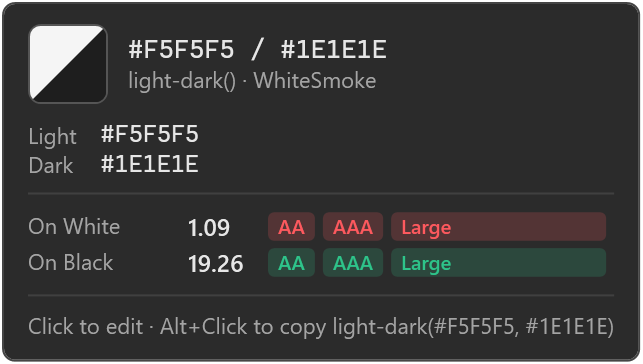
light-dark(): both values and a split swatch.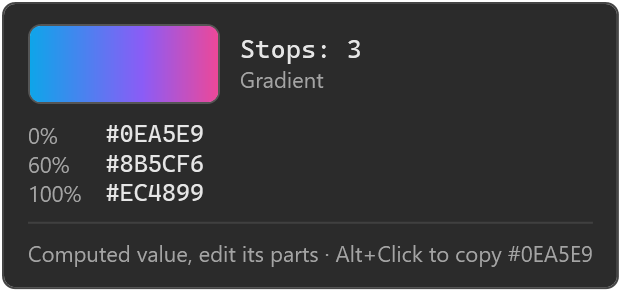
How detection works
ColorSmith does not search the text with one big regular expression. Each file is split into strings, comments and code by a lexer of its language, and a value becomes a color only if the place leaves no doubt. When in doubt, there is no swatch.
| Gets a swatch | Stays plain |
|---|---|
Foreground="Red", color: red; | <p>Red is my favorite color</p> |
"#3D8BFF", // #3D8BFF | // fixed in #123 (short hex in comments) |
Color.FromArgb(255, 61, 139, 255) | Color.FromArgb(alpha, r, g, b) (value unknown) |
bg-sky-500, text-white/80 | text-lg, border-2, bg-cover |
color="red" in Python | status = "red", (255, 0, 0) |
a { color: navy } | #main, .red selectors, font-family: Red Hat |
8-digit hex
#XXXXXXXX means alpha first in .NET, XAML and Qt (#AARRGGBB) and alpha last in CSS and JavaScript (#RRGGBBAA). For C#, VB and C++ strings the order is a setting, because Unity and web-oriented code use alpha last.
Replace in solution
Open it with the light bulb (Ctrl+.) on a color or with the button in the color card. It finds the color in every notation across the solution folder (without bin, obj and node_modules), lets you pick the places, and rewrites each in its own notation. Changed files open unsaved, with one undo step per file, so you can review everything before saving.
Settings
Tools → Options → SmithWorks → ColorSmith. Every option has a description right under it.
| Option | Default |
|---|---|
| Show Color Swatches | on |
| Display Mode | Underline |
| Swatch Size | Medium |
| Color Preview in IntelliSense | on |
| Replace in Solution | on |
| Hex Colors in Comments | on |
| Tailwind CSS Classes | on |
| Resource Colors | on |
| 8-Digit Hex in C#, VB and C++ | #AARRGGBB |
| Maximum File Size (KB) | 4096 |
| Languages | all on |
Settings are stored in %LocalAppData%\ColorSmith, together with the picker's favorites and recent colors.
FAQ
Why is there no swatch on my color?
Most likely the place is ambiguous: a name outside a color context, a call with a variable argument, a short hex in a comment, or a value built with var()/calc(). Also check that the language is turned on in the settings and the file is smaller than the size limit.
Can the colors appear as icons inside the IntelliSense list?
No. Visual Studio does not let an extension change the icons of other providers' completion items. ColorSmith shows a color chip above the caret instead.
Does the swatch shift my code?
Only in the “square before the value” mode. The margin, underline and background modes never move the text.
Can I edit a resource color from where it is used?
Not yet. The card shows each theme's value with its file and line; change it at the definition.
Does ColorSmith send any data?
No. There is no telemetry and no network access.
Where do I report a problem or suggest a feature?
Open an issue in the Feedback repository on GitHub — there are forms for bugs and ideas. You can also use the Q&A tab on the Marketplace.
Changelog
1.0.2
- Feedback: a button in the picker title bar and a “Send feedback” link in the settings open the Feedback repository on GitHub.
- Settings moved to Tools → Options → SmithWorks → ColorSmith, next to the other SmithWorks extensions.
1.0.1
- Settings button (gear) in the picker title bar opens Tools → Options → ColorSmith.
- A one-time, easy-to-dismiss request to rate the extension after long use, and a “Rate on Marketplace” link in the settings.
1.0.0
- First public release.
- Help button in the picker and a Documentation link in the settings.